
Automation tools for coaches ranked by price | Fit wins 2026
Best starting point: Google Workspace for organizing an existing coaching workflow. Best for client administration: Dubsado. Best for email sequences: Flodesk. If you're comparing automation tools for coaches ranked by price in 2026, start with the job each tool needs to do, then compare its current plan requirements. The shortlist below ranks workflow fit rather than claiming a cheapest-to-most-expensive order.
TL;DR
Compare automation tools for coaches ranked by price by workflow needs, not subscription labels alone.
Google Workspace is the first option to assess when your coaching business already uses it.
Dubsado and HoneyBook support client administration; Flodesk supports email sequences.
Tendedsprout provides done-for-you systems support for established entrepreneurs who need implementation rather than another tool.
Why this matters
A coaching business can have scheduling, forms, email, and client documents in place while still depending on manual reminders. Owning the tools does not mean the process works. The missing piece is often a clear connection between what happens first and what happens next.
Tendedsprout's systems and automation services are best for established entrepreneurs who want done-for-you implementation. Unlike a software subscription, Tendedsprout provides systems support and operations consulting. That distinction matters when your problem is unfinished setup rather than missing software.
For your 2026 decision, separate three questions: which task needs support, which tool already handles it, and who will maintain the process. A cheaper subscription does not resolve an unclear handoff. Adding another account can also create another place to check.
What makes the best automation tools for coaches?
Use these criteria before comparing plans:
Workflow fit: The tool handles a specific task, such as booking, onboarding, or email follow-up.
Existing-tool fit: It works with the systems your business already uses, without unnecessary replacement.
Clear ownership: Someone knows who checks the process and handles exceptions.
Client experience: Clients understand what to submit, where to book, and what happens next.
Plan requirements: The current plan includes the functions your workflow needs.
Maintenance: You can update messages, forms, and instructions without rebuilding everything.
Compare the complete workflow, not just the plan
A useful 2026 comparison starts with the same task for every candidate. For example, compare how each option handles a new client moving from agreement to onboarding. Do not compare one tool's email features with another tool's scheduling features and call that a meaningful ranking.
Write down the required steps before opening a plan comparison. Include any additional software needed to complete them. Keep implementation effort separate from the subscription decision, because buying access and building a working process are different jobs.
Coaching automation tools at a glance
The order below is a decision sequence: assess your existing tools first, then choose a specialist for the work that remains. Dubsado and HoneyBook are alternatives to compare, not a recommendation to adopt both.
1
Tool: Google Workspace
Best for: Organizing an existing workflow
Standout function: Shared documents, forms, calendars, and files
Key limitation: Requires a defined process across separate applications
2
Tool: Dubsado
Best for: Structured client onboarding
Standout function: Client workflows alongside forms, contracts, and invoices
Key limitation: Setup requires decisions about steps and timing
3
Tool: HoneyBook
Best for: Managing a booking-to-project process
Standout function: Client communication and project administration
Key limitation: Does not replace delivery systems for every coaching format
4
Tool: Flodesk
Best for: Subscriber email sequences
Standout function: Email workflows and subscriber organization
Key limitation: Does not manage the entire client relationship
5
Tool: Calendly
Best for: Appointment booking
Standout function: Scheduling links and calendar coordination
Key limitation: Does not organize the rest of client delivery
6
Tool: Zapier
Best for: Connecting separate applications
Standout function: Actions triggered by events in supported tools
Key limitation: Connections still need testing and maintenance
1. Google Workspace: best for organizing an existing workflow
Google Workspace brings together tools for documents, spreadsheets, forms, calendars, and file storage. For a coach already using those applications, the first question is whether clearer organization solves the problem before another subscription enters the picture.
An illustrative setup uses a form for intake, a spreadsheet for tracking, and a shared folder for client documents. That is a process design example, not a claim that every step happens automatically. More advanced connections need separate setup.
Google Workspace pros:
Keeps working documents and client materials organized.
Supports a clearly defined intake and tracking process.
Gives an existing user a starting point without changing every tool.
Google Workspace cons:
Separate applications need clear rules for how information moves.
A spreadsheet does not manage client follow-up by itself.
Shared files require deliberate access settings.
Best for: Coaches who already use Google Workspace and need a clearer operating process.
Verdict: Hold off on adding another tool until your existing workflow is organized.
2. Dubsado: best for structured client onboarding
Dubsado is a client management platform with forms, contracts, invoicing, and workflow features. Its role in this shortlist is helping a service-based coaching business organize the administrative steps around a client engagement.
Start by defining what makes a client ready for onboarding. Then decide which messages and actions follow that event. Automating an unclear sequence only makes the confusion repeat.
Dubsado pros:
Brings several client administration tasks into one platform.
Supports repeatable workflows for service engagements.
Lets you organize forms and client-facing documents around a process.
Dubsado cons:
Forms, messages, and workflow rules need preparation.
Exceptions still require a person to make decisions.
It is not a substitute for coaching materials or delivery planning.
Best for: Coaches with a repeatable onboarding process and a defined service engagement.
Verdict: Buy only after your onboarding steps are clear and the current plan matches them.
3. HoneyBook: best for a booking-to-project process
HoneyBook supports client communication, scheduling, contracts, invoices, and project administration. It belongs on the shortlist when you want to organize the business side of a coaching engagement around a client project.
Compare HoneyBook against your actual intake and booking sequence, not a general feature list. If Dubsado already serves that purpose, evaluate the gap before considering a switch. Two overlapping systems create an ownership question you must resolve.
HoneyBook pros:
Groups client-facing administration around projects.
Supports several steps between inquiry and engagement.
Provides a central place for project-related client information.
HoneyBook cons:
Moving an established process requires setup and testing.
Project administration does not cover every learning or community need.
Overlap with an existing client management tool needs careful review.
Best for: Coaches who organize individual engagements as client projects.
Verdict: Buy for a defined project-management gap; skip duplicate client administration.
4. Flodesk: best for subscriber email sequences
Flodesk is an email marketing platform with email design, subscriber organization, and workflow features. It serves a different job from client administration: sending a planned sequence to the right subscriber group.
An illustrative coaching sequence welcomes someone who requests a resource, explains the topic, and introduces a relevant next step. Client delivery messages need separate consideration. A marketing subscriber and an active coaching client are not automatically the same audience.
Flodesk pros:
Supports planned email sequences.
Organizes subscribers for relevant communication.
Provides tools for creating and sending marketing emails.
Flodesk cons:
It does not replace contracts, client records, or scheduling.
Sequences need clear entry conditions and prepared content.
Subscriber information must remain aligned with your intended audience.
Best for: Coaches with a defined subscriber journey and email content ready to use.
Verdict: Buy for email follow-up, not as an all-purpose operations system.
5. Calendly: best for appointment booking
Calendly lets people book appointments through scheduling links connected to calendar availability. Its purpose is narrow and useful: helping a client choose an appropriate appointment without a separate conversation about every possible time.
Before adding it, check whether your existing client platform already handles scheduling. Then define appointment types and availability. A booking tool cannot decide which service a client needs or whether an appointment is appropriate.
Calendly pros:
Gives clients a direct appointment-booking route.
Coordinates scheduling with connected calendars.
Keeps the booking task separate from unrelated administration.
Calendly cons:
Appointment settings need clear boundaries.
It does not handle the whole onboarding process.
It can duplicate scheduling functions elsewhere in your business.
Best for: Coaches whose main friction is arranging appointments.
Verdict: Buy for scheduling friction; skip it when an existing tool already handles booking.
6. Zapier: best for connecting separate applications
Zapier connects supported applications through workflows in which an event triggers an action. For example, a submitted form can start a follow-up action in another supported application. The exact connection depends on the applications and functions involved.
Use Zapier after the workflow is clear. Otherwise, you are connecting tools without deciding what information should move, when it should move, or who checks the result.
Zapier pros:
Connects tasks across supported applications.
Supports workflows that extend beyond a single platform.
Helps preserve existing tools when a suitable connection is available.
Zapier cons:
Required actions must be supported by the relevant applications.
Failed or changed connections need attention.
It adds another system to maintain.
Best for: Coaches with a defined handoff between separate applications.
Verdict: Wait until the process works manually, then automate the specific connection.
Turn a tool shortlist into a working process
For your 2026 review, choose 1 workflow rather than trying to rebuild the whole business. New-client onboarding is a useful starting point when you repeatedly chase forms, send the same instructions, or check whether a client is ready.
The following is an illustrative workflow, not a verified client result:
Client intake: Collect the information needed to begin.
Readiness check: Confirm that the required administrative steps are complete.
Welcome message: Send instructions that explain what happens next.
Session booking: Give the client the appropriate booking route.
Exception review: Flag anything incomplete for a person to resolve.
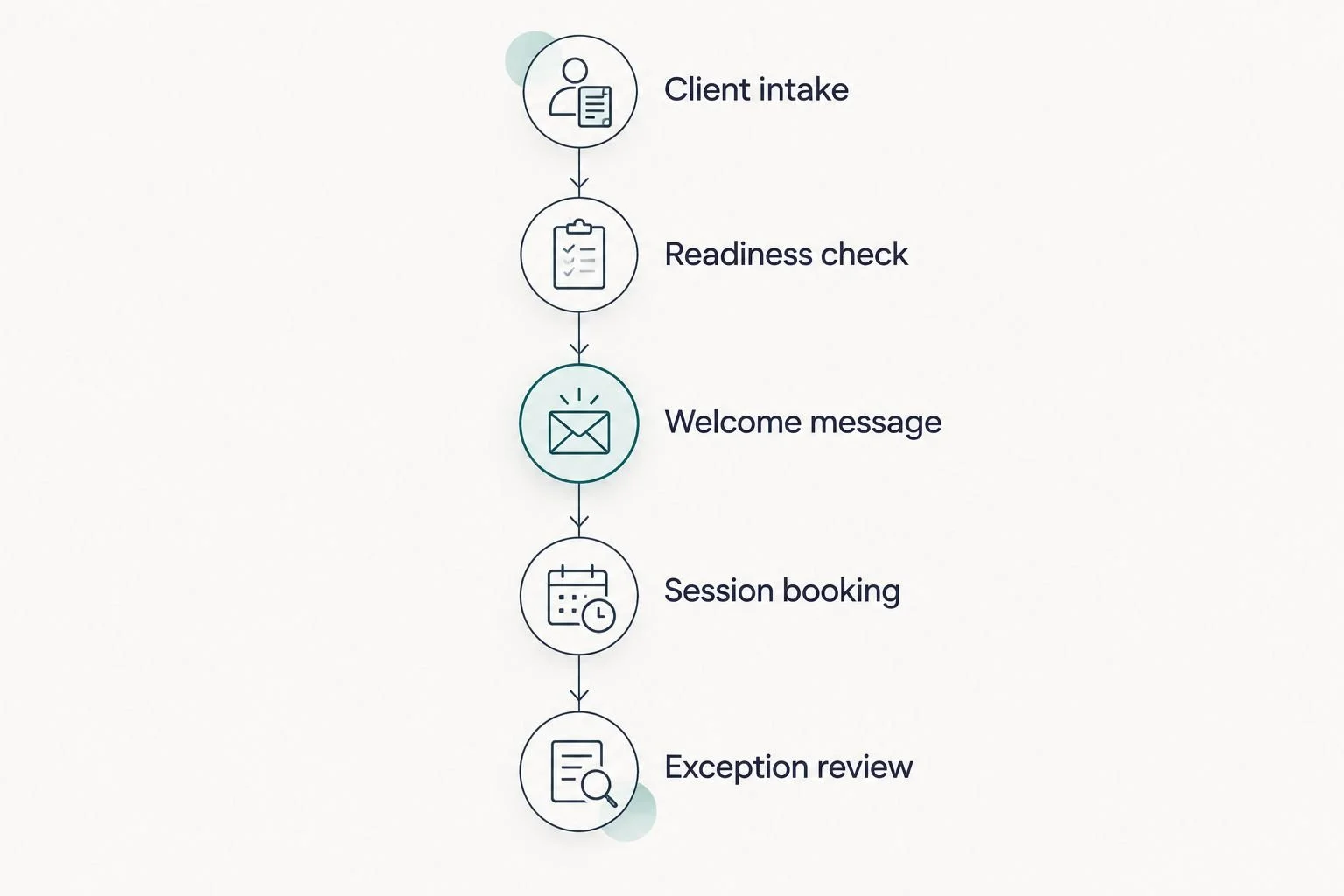
Define the client journey before deciding which steps to automate.
Next, inspect 2 handoffs: how intake becomes a ready client, and how readiness becomes a booked session. At each handoff, identify the information required and the person responsible for exceptions.
Run 3 test cases before relying on the setup: a complete submission, an incomplete submission, and a duplicate submission. Check the messages and records each case produces. These are recommended checks, not performance claims or promised results.
Done-for-you systems support or an Online Business Manager?
Done-for-you systems support focuses on designing and implementing how work moves. An Online Business Manager typically focuses on ongoing coordination of business operations, projects, and people. The scope of any individual engagement still needs a clear agreement.
Choose based on the work you need covered:
Done-for-you systems support
Best for: Building or repairing repeatable workflows
Main benefit: Dedicated implementation
Main limitation: Does not automatically include ongoing management
Online Business Manager
Best for: Coordinating continuing operational work
Main benefit: Ongoing oversight
Main limitation: Hiring does not itself complete every systems project
Tendedsprout focuses on systems already integrated into your business. Blooming Systems, its one-day workflow transformation, is relevant when you want focused implementation rather than another software selection exercise. A defined scope remains essential; one day is not a promise to rebuild every operation.
How these tools were ranked
This 2026 shortlist prioritizes existing-tool fit, a distinct workflow role, clear ownership, and maintenance. It starts with organization, moves through specialist tasks, and ends with connections between applications. It does not present a price league table or treat unlike tools as interchangeable.
Which coaching automation tool should you choose?
Start with the tool that addresses your specific broken step. Assess Google Workspace first if you already use it. Compare Dubsado and HoneyBook for client administration, Flodesk for email sequences, and Calendly for booking. Consider Zapier only when separate applications need a defined connection.
If the tools are already there but the process remains unfinished, choose implementation support. Tendedsprout's automation services address that different need. Your 2026 decision should end with a working process, not simply another account.
FAQ
What's the best way to compare automation tools for coaches ranked by price?
Compare tools that perform the same job, then check their current plans against one defined workflow. Include any additional applications needed to complete the process rather than comparing subscription labels alone.
Should I choose Dubsado or HoneyBook for my coaching business?
Choose the platform that matches your client administration process. Compare the same intake, contract, invoicing, and onboarding steps in both, and check the current plan requirements before deciding.
Can Google Workspace handle my coaching operations?
Google Workspace can support documents, intake forms, calendars, file storage, and tracking. You still need a clear process for moving information between those tools and handling client follow-up.
Does Flodesk replace a client management system?
No. Flodesk supports email marketing and subscriber workflows, while client administration includes different tasks such as contracts, invoices, and engagement records.
Do I need Zapier if my tools already have automation?
Use Zapier when you need a supported connection between separate applications. First check whether an existing tool can complete the required action without adding another system.
Is done-for-you systems support the same as hiring an Online Business Manager?
No. Done-for-you systems support focuses on implementation, while an Online Business Manager typically provides ongoing operational coordination. Confirm the responsibilities included in either engagement.
What should I automate first in my coaching business?
Start with one repeatable workflow that has a clear beginning and end. Define the required information, the next action, and the person responsible when something is incomplete.
One last thing
Write the exception rule before automating the normal path. Decide what happens when a client submits incomplete information or books the wrong appointment. That small decision gives the workflow an owner when the software cannot finish the job.