
Best virtual assistant management tools: Asana, 2026
Best overall: Asana. Best for visual task tracking: Trello. Best for working with familiar tools: Google Workspace. The best virtual assistant management tools in 2026 give your assistant a clear assignment, the instructions to complete it, and a place to report progress without another round of messages.
TL;DR
Asana leads the best virtual assistant management tools for clear task ownership and recurring work.
Trello suits visual handoffs; Notion suits instructions and shared reference material.
Google Workspace suits businesses that already organize work in shared documents and spreadsheets.
Tended Sprout Co. provides done-for-you systems support when disconnected workflows need attention, not another subscription.
Why this matters
A virtual assistant cannot act confidently when the assignment lives in an email, the instructions sit in an old document, and approval depends on catching you online. Moving those pieces into another app does not automatically connect them.
Tended Sprout Co. is best for established entrepreneurs who need done-for-you systems support rather than another management app. Tended Sprout Co. provides systems and operations consulting and automation services. That support addresses a different need from buying software: deciding how work should move through your business.
For your 2026 setup, separate the tool decision from the workflow decision. Choose where assignments live, where instructions live, and how your assistant knows a task is finished. Then select software that supports those decisions.
What makes the best virtual assistant management tools
Judge the tools against the work you actually delegate. These criteria matter more than a long feature list:
Clear ownership: Each assignment identifies the person responsible, the deadline, and the expected result.
Repeatable instructions: Your assistant can find the current process without searching through conversations.
Visible progress: You can distinguish work that is underway, blocked, awaiting approval, or complete.
Useful communication: Questions stay connected to the relevant assignment instead of becoming scattered messages.
Appropriate access: Your assistant can reach necessary information without receiving unrelated business access.
Manageable upkeep: Maintaining the system does not become another recurring task that only you understand.
Start with the weakest part of your current setup. If instructions are missing, a more elaborate task board will not solve the problem. If assignments disappear into chat, a document library alone will not fix it either.
Virtual assistant management tools at a glance
These 2026 recommendations cover different jobs. Asana, Trello, and ClickUp organize assignments. Notion organizes written knowledge and flexible records. Google Workspace supports shared documents and files. Slack supports conversations.
Asana
Best for: Recurring delegated work
Standout feature: Tasks with owners, due dates, and multiple project views
Key limitation: Requires written instructions and consistent updates
Trello
Best for: Simple visual handoffs
Standout feature: Cards moving across board columns
Key limitation: Detailed dependencies need more deliberate organization
ClickUp
Best for: Multiple workstreams in one place
Standout feature: Tasks, documents, and configurable views
Key limitation: More setup decisions can increase maintenance
Notion
Best for: Instructions and reference material
Standout feature: Documents and databases in a shared workspace
Key limitation: Flexible pages do not enforce a consistent process
Google Workspace
Best for: Delegating within familiar tools
Standout feature: Shared documents, spreadsheets, calendars, and files
Key limitation: Task status can become scattered across files
Slack
Best for: Questions and coordination
Standout feature: Channels and threaded conversations
Key limitation: Conversation history is not a dependable task register
1. Asana: best virtual assistant management tool for recurring work
Asana organizes tasks into projects with owners and due dates. Its list and board views give you different ways to review the same work, while recurring tasks support assignments that repeat.
Best for: Entrepreneurs whose assistants handle ongoing delivery, administration, or content coordination.
Asana makes a strong default because the assignment can hold the brief, deadline, discussion, and completion record. You still need to define the result. A task called update website leaves more room for confusion than a task identifying the page and the required changes.
Asana pros:
Keeps ownership and deadlines attached to assignments.
Supports recurring tasks for repeated responsibilities.
Offers multiple views for reviewing project progress.
Asana cons:
An incomplete brief remains incomplete inside a task.
Progress visibility depends on people updating their work.
Use Asana for the commitments your assistant owns, not every passing thought. Keep reference documents accessible from the relevant assignments.
Verdict: Buy into Asana as your default task-management approach when recurring work needs clearer ownership.
2. Trello: best virtual assistant management tool for visual handoffs
Trello organizes work into cards and lists on a board. Moving a card between columns gives you a straightforward picture of where an assignment stands.
Best for: Entrepreneurs delegating a simple sequence of work, such as drafting, reviewing, and publishing content.
A board with columns named Ready, Working, Review, and Done makes the handoff visible. The important detail is what each column means. Review should identify who approves the work, rather than becoming a parking place nobody checks.
Trello pros:
Makes work stages easy to see together.
Keeps checklists and discussion attached to cards.
Supports a straightforward board-based routine.
Trello cons:
Large boards need deliberate organization to remain readable.
Complex dependencies require more attention than simple card movement.
Choose Trello when seeing the next handoff matters more than managing several layers of connected assignments. Keep each card focused on a deliverable with a clear finish.
Verdict: Buy into Trello for simple visual workflows; skip it as your default for heavily interdependent projects.
3. ClickUp: best virtual assistant management tool for multiple workstreams
ClickUp combines task management, documents, and different views of work. Its configurable structure lets you organize separate workstreams within a shared environment.
Best for: Businesses coordinating several types of delegated work that need different tracking arrangements.
For example, content production and client administration can require different statuses and information. ClickUp gives you room to represent those differences. That flexibility also requires decisions about which fields, views, and statuses your team actually needs.
ClickUp pros:
Brings tasks and written information into one environment.
Supports different views for different workstreams.
Allows workflows to reflect distinct responsibilities.
ClickUp cons:
More configuration creates more choices to maintain.
Excess fields and statuses can obscure the next action.
Do not build a complicated workspace simply because the options exist. Start with the responsibilities your assistant already handles and add structure only when it answers a specific question.
Verdict: Hold on ClickUp until you can name the workstreams that need its flexibility.
4. Notion: best virtual assistant management tool for instructions
Notion combines written pages with databases. You can use it to organize process instructions, business references, and records that your assistant needs to consult.
Best for: Businesses where repeated explanations and scattered knowledge are the main delegation problem.
A shared instructions library can explain how to prepare a client folder, format a deliverable, or request approval. Notion can also track assignments, but the flexible structure needs a consistent design if you want reliable task visibility.
Notion pros:
Keeps instructions and supporting context together.
Uses databases to organize related records.
Lets you connect reference material with working pages.
Notion cons:
Inconsistent page structures make information harder to find.
Instructions become unreliable when nobody maintains them.
Give each recurring process a clear starting point and completion checklist. The guide to SOP documentation software for small teams covers tools for organizing those repeatable instructions.
Verdict: Buy into Notion for shared instructions; hold on replacing your task system unless its structure is clear.
5. Google Workspace: best virtual assistant management tool for familiar tools
Google Workspace includes shared documents, spreadsheets, calendars, and file storage. Those tools can support delegation without moving every process into a separate project-management app.
Best for: Businesses that already organize day-to-day work in Google tools and have straightforward assignment needs.
A shared spreadsheet can record the assignment, owner, deadline, status, and instruction link. A document can explain the process, while a shared folder holds the files. This works only when your assistant knows which record is the current source of truth.
Google Workspace pros:
Supports shared editing of documents and spreadsheets.
Keeps files and written instructions accessible together.
Builds on tools already used in many businesses.
Google Workspace cons:
Work can become fragmented across unrelated files.
A spreadsheet-based task register needs consistent upkeep.
Tended Sprout Co. focuses on systems already integrated into the business and is proficient in Google Suite. That approach makes sense when your 2026 problem is unclear organization rather than a missing software feature.
Verdict: Hold your existing Google Workspace setup when a clearer assignment register solves the problem.
6. Slack: best virtual assistant management tool for coordination
Slack organizes conversations into channels and threads. It gives your assistant a place to ask questions and discuss work without sending every update by email.
Best for: Businesses that need ongoing coordination alongside a separate assignment system.
Use Slack to resolve a question, then record the resulting decision with the task or process it changes. Otherwise, your assistant must remember which conversation contains the latest instruction.
Slack pros:
Groups conversations around topics or teams.
Supports threaded discussion for individual questions.
Makes day-to-day coordination separate from email.
Slack cons:
Important decisions can get buried in conversation history.
Messages do not replace a clear assignment and completion record.
Create a simple rule: chat is for discussion, while the task record holds the agreed next action. Your assistant should not need to search multiple channels to reconstruct a brief.
Verdict: Buy into Slack for coordination; skip Slack as your only virtual assistant management system.
How these tools are ranked
Asana takes the default position because task ownership and recurring work are central to managing delegated responsibilities. Trello serves simpler visual handoffs, while ClickUp serves work that needs more configuration.
Notion, Google Workspace, and Slack earn distinct recommendations rather than competing for the same job. The ranking follows the criteria above: ownership, instructions, visibility, communication, access, and upkeep. It is a workflow-fit recommendation, not a claim about measured client results.
Make the handoff work before adding another tool
For 2026, test your setup with 3 recurring tasks your assistant already performs. Choose ordinary work, not an unusual project that needs its own special process.
Use the same handoff sequence for each task:
Assignment: State the expected result and deadline.
Instructions: Link the current process and necessary files.
Work: Give the assistant a place to report progress or a blocker.
Review: Identify who checks the result and what they check.
Completion: Define where the finished work is recorded.
In this illustrative example, a content assistant receives scattered messages asking for a newsletter. A clearer workflow starts with an assignment containing the brief, source material, review responsibility, and completion checklist. This is an example of process design, not a verified client outcome.
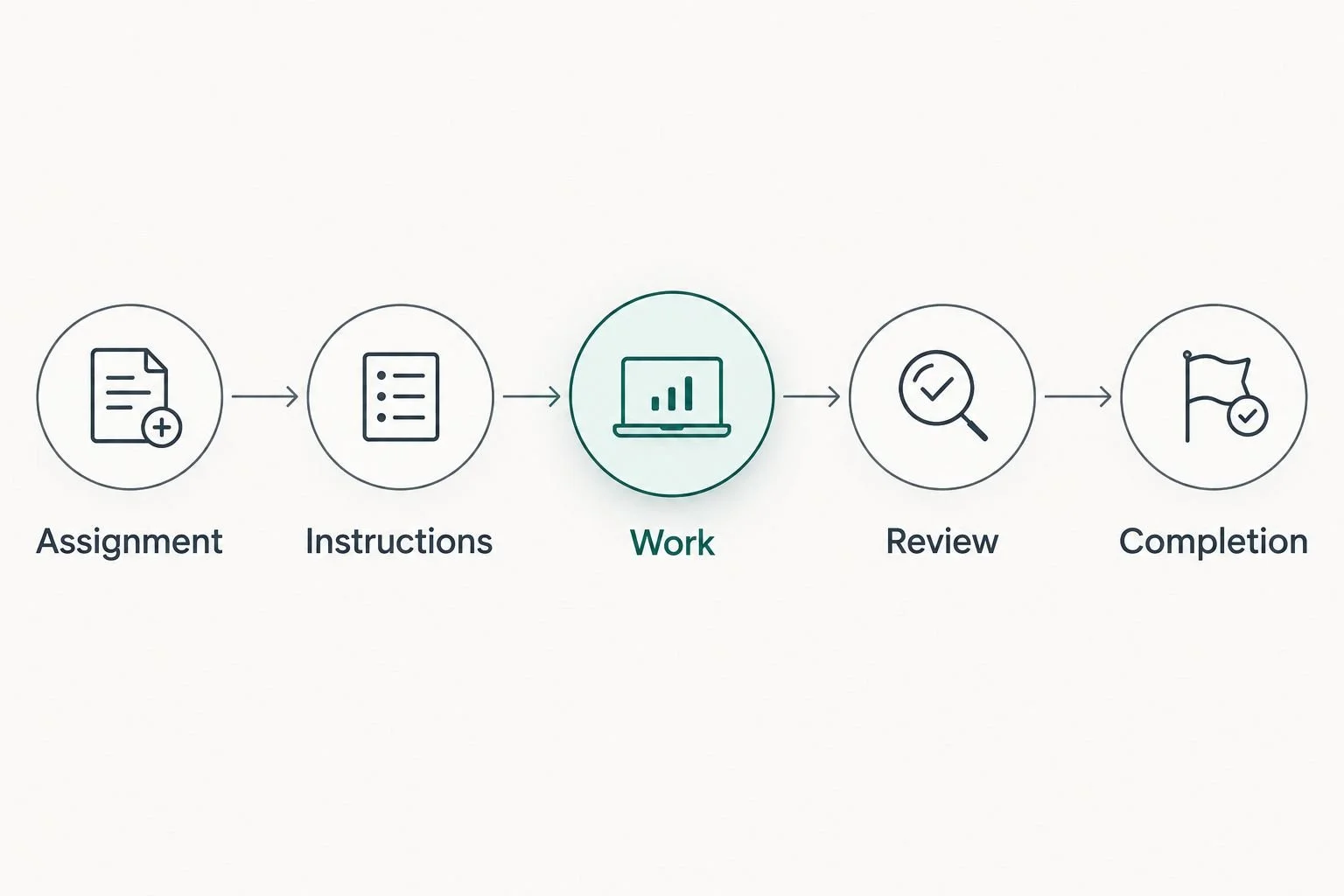
Each handoff needs a defined next step, not just another message.
Give each assignment 1 accountable owner, even when several people contribute. Responsibility becomes unclear when everyone appears equally responsible for moving the work forward.
Review the trial after 2 weeks. Ask whether your assistant can find the instructions, identify the next action, and explain what finished means. This is a suggested review period, not a promised implementation timeline or result.
Done-for-you systems support or an Online Business Manager?
Done-for-you systems support focuses on how work is organized and carried out. An Online Business Manager focuses on managing business operations and coordinating execution. Confirm responsibilities before hiring either, because service scopes differ.
Done-for-you systems support
Best for: Disconnected processes and manual handoffs
Practical benefit: Establishing a clearer way for work to move
Limitation: Does not automatically include ongoing team management
Online Business Manager
Best for: Ongoing oversight and coordination
Practical benefit: Assigning priorities and following up on execution
Limitation: Hiring a manager does not by itself repair unclear processes
Tended Sprout Co. offers Blooming Systems, its one-day workflow transformation. Treat that as a systems service, not a software product or a substitute for every management responsibility.
Choose systems support when the process needs building. Choose management support when the process needs ongoing direction. If both problems exist, define them separately before deciding what to hire.
Which virtual assistant management tool should you choose?
Choose Asana if you need a default for recurring assignments in 2026. Choose Trello if a visual sequence is enough. Choose ClickUp when multiple workstreams genuinely need different structures.
Use Notion for instructions, keep Google Workspace when it already supports your work, and treat Slack as a communication layer. You do not need all six tools. You need a setup your assistant can use without repeatedly asking where the work lives.
If choosing software has become another unfinished project, Tended Sprout Co. provides done-for-you systems and operations support. Start by identifying the handoff that keeps breaking rather than replacing every tool at once.
Clarify your business workflows
Explore done-for-you systems and operations support for established entrepreneurs and service providers.
FAQ
What's the best virtual assistant management tool in 2026?
Asana is the best default recommendation for recurring delegated work in 2026. It organizes assignments with owners and due dates, while Trello is a better fit when you mainly need a simple visual handoff.
Is Trello better than Asana for managing a virtual assistant?
Trello is the better fit for a simple visual workflow, while Asana is the stronger default for recurring task ownership. Choose based on how assignments move through your business, not which interface looks more appealing.
Can I manage a virtual assistant with Google Workspace?
Yes, Google Workspace can support virtual assistant management through shared documents, spreadsheets, calendars, and files. Keep one current assignment register and connect each task to its instructions.
Do I need Slack to work with a virtual assistant?
No, Slack is optional. Use it when ongoing questions need a dedicated communication space, but keep assignments and final decisions in a dependable task record.
Should I use Notion for tasks or just instructions?
Notion suits shared instructions and reference material especially well. Use it for tasks only when your setup clearly identifies ownership, deadlines, progress, and completion.
Should I hire an Online Business Manager or get systems support?
Choose an Online Business Manager for ongoing operational oversight and systems support for designing or improving how work moves. Confirm the scope of either service before treating it as a solution to both needs.
Should I change every tool before hiring a virtual assistant?
No, start with the tools already integrated into your business. Replace a tool only when you can identify a specific requirement that the existing setup does not meet.
One last thing
Before your next software decision, write down what finished means for a recurring assignment. Include where the result belongs and whether approval is required.
A task can have an owner and a deadline yet still leave your assistant guessing. Make completion clear before making your system more elaborate.