
Best Team Communication Tools for Remote Agencies 2026: Slack
Best overall: Slack for fast internal discussions. Best for meeting-heavy teams: Microsoft Teams. Best for teams already working in Google Workspace: Google Chat. Best for project updates that need a lasting record: Basecamp. These are the best team communication tools for remote agencies in 2026 when each tool has a clear job, rather than becoming another place to look for an answer.
TL;DR
Slack is the best team communication tool for remote agencies that need fast, organized internal discussion.
Microsoft Teams fits meeting-heavy agencies; Google Chat fits teams already working in Google Workspace.
Basecamp keeps project updates closer to the work, but is not the pick for rapid back-and-forth.
Tended Sprout Co. helps established service providers connect communication choices to their existing operations.
Why this matters
A remote agency can have a capable team and still lose track of decisions. A request arrives in chat, the brief lives elsewhere, and the person doing the work has to ask which version is final. The problem is not always the communication tool. It is the lack of a shared rule for where requests, decisions, and handoffs belong.
In 2026, choose a tool by the kind of conversation your team needs most. Then give lasting information a separate home. A small-team SOP documentation guide helps with the second part: keeping instructions findable after a conversation has ended.
Tended Sprout Co. is best for established service providers who need help setting up the workflow around their team communication tools. It provides done-for-you systems and operations support; it is not another chat app to add to the list.
What makes the best team communication tool for a remote agency?
Use these criteria before comparing features. A tool that feels easy during a quiet week still needs to work when several people need the same answer.
Conversation fit: Can your team handle its usual mix of quick questions, meetings, and project updates without forcing every exchange into one format?
Decision clarity: Can someone find the agreed next step without reading an entire discussion?
Work context: Does the conversation stay close enough to the relevant project or document for the next person to act?
Attention control: Can people tell what needs a response now and what can wait?
Existing tools: Does the choice work with the systems your business already uses? A familiar option is often easier to put into practice than a new place to check.
Client boundaries: Can you decide what stays within the team and how client requests enter the workflow?
No tool settles those questions on its own. Write down the rules alongside the choice. For example, a team can agree that chat is for questions, a project space holds final decisions, and the person assigning work names its owner. That is a proposed workflow, not a claim about how any particular agency operates.
The best options at a glance
Slack
Best for: Fast internal discussion
Standout feature: Channels and threaded replies
Key limitation: Decisions can get buried in active conversations
Microsoft Teams
Best for: Meeting-heavy collaboration
Standout feature: Chat and meetings in one tool
Key limitation: Needs clear boundaries between chats, channels, and files
Google Chat
Best for: Google Workspace-centered teams
Standout feature: Conversations alongside familiar Google tools
Key limitation: Less useful when most work happens outside that setup
Basecamp
Best for: Project updates with a lasting record
Standout feature: Message boards and project-based discussion
Key limitation: Not the strongest fit for constant quick exchanges
The table is a starting point, not a reason to add another subscription to your workflow. If your current tool already fits its assigned job, fix unclear handoffs before replacing it.
1. Slack: best team communication tool for fast internal discussion
Slack organizes conversations into channels and threaded replies. That makes it a practical default for a remote agency whose team asks frequent questions across roles. Its strength is speed; its weakness is that speed can make an important decision look like just another reply.
Slack is the best overall pick in 2026 for agencies that need a clear home for everyday internal conversation. Put quick questions and working discussions there. Move approved instructions, final decisions, and client-facing commitments into the place where the work is managed.
Slack pros:
Channels give recurring topics and teams recognizable places to talk.
Threads keep a reply attached to the question it answers.
Team members can raise a blocker without scheduling a meeting.
Slack cons:
A busy channel is a poor permanent home for a final brief.
Too many channels make it harder to know where a question belongs.
Frequent messages can interrupt focused work when response rules are unclear.
Best for: Remote agencies that rely on quick internal answers during active work.
Picture an illustrative design handoff. An account lead asks in Slack whether the client approved a change. A teammate answers in a thread, then updates the project brief with the approved direction. The next designer reads the brief, not the whole conversation. That final step is the workflow rule that keeps Slack useful.
Verdict: Buy if fast internal discussion is the gap you need to fill. Hold if your team already has a workable chat tool and the real problem is missing decisions in project records.
2. Microsoft Teams: best for meeting-heavy agency collaboration
Microsoft Teams brings chat, channels, and meetings into one place. It fits an agency that already does much of its work through Microsoft tools and needs conversations to continue around scheduled calls. It does not remove the need to separate a meeting discussion from its final action list.
For a meeting-heavy team, start by deciding where the result of each call will live. The meeting is where people resolve the question. The project record is where the owner, next step, and agreed direction remain visible afterward.
Microsoft Teams pros:
Chat supports quick follow-up between meetings.
Channels give ongoing team discussions a shared location.
Meetings and team conversations sit within the same environment.
Microsoft Teams cons:
A decision can still disappear into a private chat or meeting conversation.
Teams need rules for which discussions belong in channels rather than direct messages.
It is a less natural first choice when the business does not already work in Microsoft tools.
Best for: Remote agencies whose internal collaboration centers on meetings and Microsoft tools.
Here is an illustrative handoff: a project lead agrees on revised work during a call, then adds the decision to the project record and assigns the next action. A follow-up question can happen in Teams. The assigned work should not depend on someone remembering what was said on the call.
Verdict: Buy when meetings and Microsoft tools already shape the work. Hold when your agency would adopt it only to solve a documentation problem.
3. Google Chat: best for Google Workspace-centered teams
Google Chat offers direct messages and shared spaces for team conversation. For an agency already working in Google Workspace, it gives internal questions a place to live without introducing an unrelated communication environment. That makes it a sensible choice when the team mainly needs a straightforward way to discuss work, not another process to manage.
Its fit depends on what sits around the conversation. If the brief is in a Google document, agree which document is the source of truth. If a request arrives in a message, name the person responsible for moving it into the work plan.
Google Chat pros:
Direct messages handle short individual questions.
Spaces give group discussions a shared location.
It fits a team that already uses Google Workspace for daily work.
Google Chat cons:
A message is not a substitute for an assigned task.
Important decisions still need a home outside a running conversation.
Its main advantage matters less when the team works mostly outside Google Workspace.
Best for: Remote agencies already using Google Workspace that want straightforward internal chat.
Consider an illustrative content workflow. A writer asks a question in a shared space, the editor replies, and the writer updates the working brief. The brief then tells the next person what to do. If everyone has to search the space to reconstruct the answer, the handoff is incomplete.
Verdict: Buy if Google Workspace already anchors your agency's work. Hold if the team needs clearer ownership more than a different way to send messages.
4. Basecamp: best for project updates with a lasting record
Basecamp groups project work and communication in project spaces, with message boards for updates and chat for quicker discussion. It is the strongest fit on this list when an agency wants substantial project updates to remain attached to the project. It is not the default pick for a team whose main need is rapid back-and-forth throughout the day.
The distinction matters. A project update should tell someone what changed and what happens next. A quick exchange can help people reach that decision, but it should not be the only record of it.
Basecamp pros:
Project spaces keep discussions tied to the relevant work.
Message boards suit updates that people need to revisit.
Its mix of discussion and project tools supports a shared view of progress.
Basecamp cons:
Its project-centered approach is more than a team needs if it only wants chat.
Quick questions and lasting updates still need separate team rules.
Moving existing project work into a new tool creates a handoff of its own.
Best for: Remote agencies that want project communication and the work itself kept close together.
An illustrative use case is a campaign change. The lead posts the agreed direction in the project space, names the next action, and uses chat only for clarification. Someone joining the work later can read the update without asking the team to repeat the discussion.
Verdict: Buy when scattered project updates are the central problem. Hold when your existing project space works and your team only needs better habits for using it.
How we ranked these tools
The 2026 ranking puts each option in a distinct job: fast discussion, meetings, Google Workspace-centered chat, or project-based updates. The criteria are conversation fit, decision clarity, work context, attention control, existing tools, and client boundaries. No single tool wins every category.
Slack ranks first because fast internal conversation is the broadest use case covered here. That does not make it the right replacement for a project record. Microsoft Teams and Google Chat become stronger choices when they fit tools the team already uses. Basecamp moves ahead when project updates, rather than quick exchanges, are the main need.
This is a workflow-based recommendation, not a claim that these tools were tested against one another. Use the limitations in each section to rule out a poor fit before you change anything.
Turn the choice into a working communication system
Picking an app is only the first decision. In 2026, the useful question is whether a person can receive a request, find the right context, and see who owns the next step. Set a few plain-language rules before changing tools.
Decide purpose. Say which conversations belong in chat, which belong in meetings, and which updates must stay with the project.
Set channels. Give each shared space a clear reason to exist. Remove or rename spaces whose purpose nobody can explain.
Choose response. Agree what needs a prompt answer and what can wait for a planned check-in. This is a team rule, not a feature to buy.
Record decisions. Put the final answer in the project brief, task, or procedure that the next person will actually open.
Review friction. Ask where requests still get lost, then adjust the rule that failed before adding another tool.
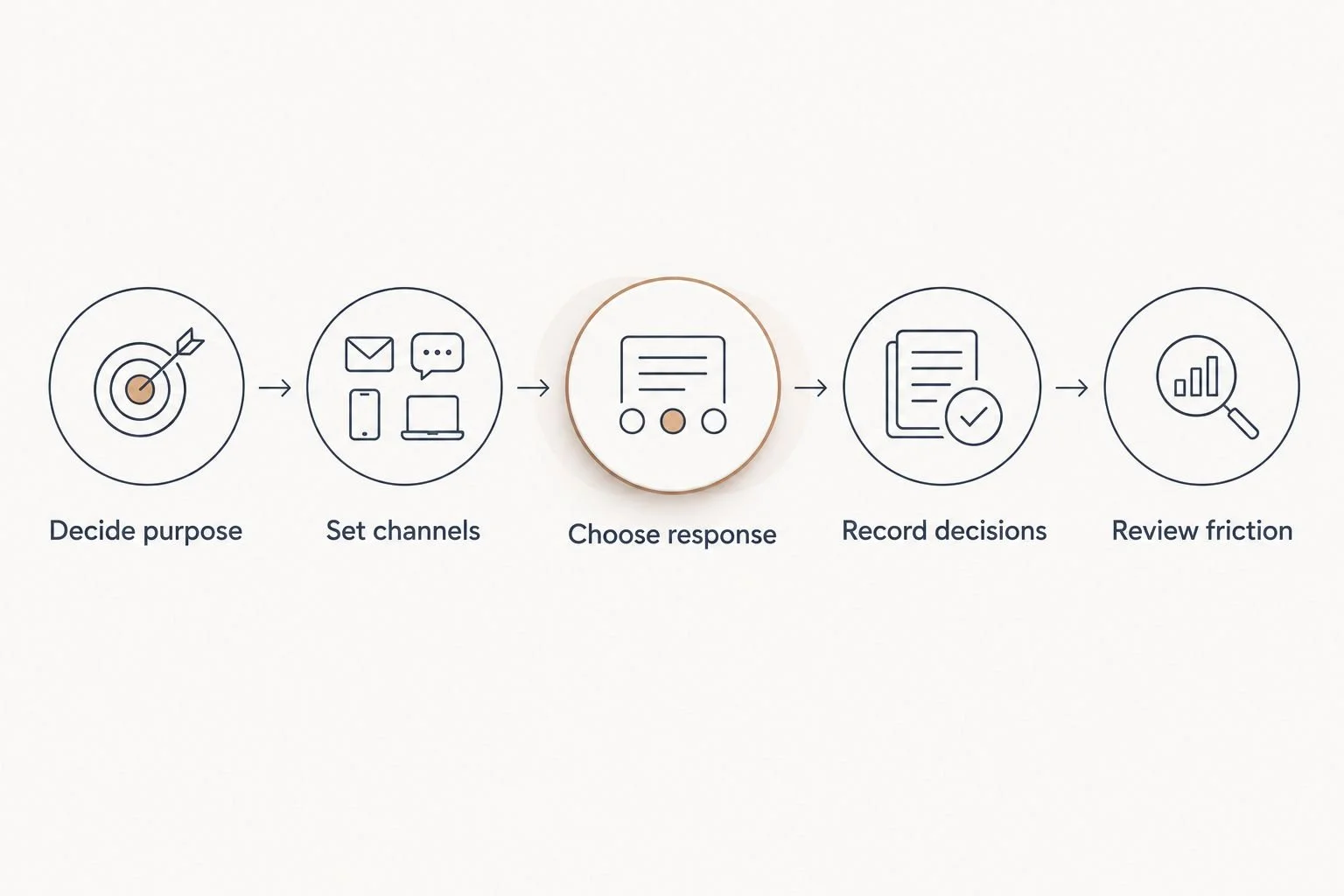
A final decision needs a home outside the conversation that produced it.
Here is an illustrative before-and-after workflow, not a client result. Before: a service request arrives in a private message, its deadline is discussed on a call, and the person doing the work has to ask for the brief. After: the message identifies the request, the project record holds the agreed scope and owner, and chat handles only questions that arise while the work moves along.
Tended Sprout Co. provides done-for-you systems and operations support for established entrepreneurs and service providers facing this kind of disconnected work. An Online Business Manager is a role a business can hire to manage ongoing operations. Done-for-you systems support focuses on setting up and connecting the way work moves. Decide whether you need someone to manage the work day to day, help building the workflow, or both. Tended Sprout Co. focuses on systems already integrated into the business, rather than treating every problem as a reason to replace a tool.
Which team communication tool should you choose?
Choose Slack as the 2026 default if your remote agency needs a better place for fast internal discussion. Choose Microsoft Teams when meetings and Microsoft tools shape the team's day. Choose Google Chat when Google Workspace is already the center of the work. Choose Basecamp when the bigger problem is keeping project updates close to project work.
If conversations are happening but tasks still stall, pause before switching apps. Trace one request from arrival to completion. Note where its owner, approved direction, or next step becomes unclear. That point tells you what to fix. Tended Sprout Co.'s systems support fits an established service business that wants help putting those working rules in place, rather than simply choosing another team communication tool.
FAQ
What is the best team communication tool for remote agencies in 2026?
Slack is the best default for remote agencies that need fast, organized internal discussion. Microsoft Teams, Google Chat, or Basecamp is a better fit when meetings, Google Workspace, or project-based updates define the work.
Is Slack better than Microsoft Teams for a remote agency?
Slack is the stronger pick for an agency prioritizing quick internal discussion. Microsoft Teams fits better when meetings and Microsoft tools already shape how the team collaborates.
Should an agency use Google Chat if it already uses Google Workspace?
Google Chat is a sensible choice when the team already works in Google Workspace and needs straightforward internal conversation. Keep final decisions in the relevant brief or task, not only in a message.
Is Basecamp a chat tool or a project tool?
Basecamp supports both project communication and quicker chat. Choose it when keeping updates close to project work matters more than finding a standalone chat tool.
How do remote agencies stop decisions from getting lost in chat?
Put each final decision in the project record or procedure that the next person will use. Chat can hold the discussion, but the record needs the agreed direction, owner, and next step.
Does a remote agency need both a communication tool and an Online Business Manager?
A communication tool provides a place to talk; an Online Business Manager is a role that manages ongoing operations. Done-for-you systems support is a different choice when the immediate need is to set up how requests, decisions, and handoffs move through the business.
One last thing
The most useful 2026 test does not start with a feature list. Ask someone to find the final decision on a recent piece of work without asking the person who made it. If the answer lives only in a conversation, improve the handoff first. A better chat tool will not write that rule for your team.