
Best Time Tracking Tools for Service Providers: Picks 2026
Best overall: Toggl Track. Best for client billing: Harvest. Best for shared team timesheets: Clockify. Best for automatic activity capture: Timely. Best for understanding distractions: RescueTime. These are the best time tracking tools for service providers in 2026, with different strengths depending on what you need your time records to do.
TL;DR
The best time tracking tools for service providers include Toggl Track for straightforward project tracking and Harvest for client billing.
Clockify suits shared team timesheets; Timely suits reviewing automatically captured work activity.
RescueTime suits understanding distractions, not replacing a client billing workflow.
Choose a repeatable recording process before adding another app to your business.
Why this matters
Your time tracker should answer a business question, not create another administrative task. You might need to understand which service takes the most effort, record billable work, or see where your working day goes.
Those are different jobs. A timer that works well for project records is not automatically the right choice for understanding interruptions.
Tendedsprout provides systems, operations consulting, and automation services for established online entrepreneurs and service providers. Tendedsprout is best for service providers who need done-for-you systems support rather than another standalone time tracking app.
Start by deciding what you will do with the information. If nobody reviews the records or uses them to make decisions, a more detailed report will not fix the underlying problem.
What makes the best time tracking tools for service providers?
Use these criteria to choose your 2026 time tracking setup:
Easy recording: You should be able to capture work without repeatedly interrupting it.
Useful organization: Client, project, and task labels should match how you actually deliver services.
Clear reporting: Records should answer your question about billing, workload, or focus.
Appropriate capture: Manual timers and automatic activity recording solve different problems.
Team responsibility: Everyone should know who records time and who checks incomplete entries.
Workflow fit: The tracker should fit alongside your existing systems rather than duplicate them.
Do not choose based on the longest feature list. Choose based on the part of your working day that needs clearer records.
For example, a consultant checking project effort needs a different view from an agency reviewing several people's timesheets. Neither necessarily needs detailed records of every website visited.
Time tracking tools at a glance
Toggl Track
Best for: Straightforward project time tracking
Standout feature: Timer-based entries organized by client and project
Key limitation: Manual recording still depends on consistent habits
Harvest
Best for: Connecting tracked work with client billing
Standout feature: Time tracking and invoicing in one tool
Key limitation: Requires careful billing and project setup
Clockify
Best for: Shared team timesheets
Standout feature: Timer and timesheet recording for teams
Key limitation: Inconsistent labels make team reports harder to interpret
Timely
Best for: Reviewing automatically captured work
Standout feature: Automatic activity capture for building time records
Key limitation: Captured activity still needs review and classification
RescueTime
Best for: Understanding distractions and work habits
Standout feature: Reports based on computer activity
Key limitation: Activity categories do not establish client billable time
These tools are alternatives for different needs, not a suggested software bundle. Start with the row that matches your immediate problem.
1. Toggl Track: best for straightforward project time tracking
Toggl Track records time against projects and clients through timers and manual entries. Its reports let you review how recorded time is distributed across your work.
This makes it a useful default when you want to answer a simple question: how much effort does each client or service require? You can start with broad categories instead of trying to document every small action.
Toggl Track pros:
Supports timer-based and manually entered time.
Organizes entries around projects and clients.
Provides reports for reviewing recorded effort.
Works for individual tracking as well as team use.
Toggl Track cons:
Forgotten timers leave records needing correction.
Vague descriptions make later review less useful.
Time reports do not explain why a task took longer than expected.
Best for: A consultant, creative service provider, or small team that needs clear project records without making invoicing the center of the setup.
For a useful starting structure, record the client, the service, and a short description of the work. Avoid creating a separate task category for every email. Too much detail adds recording work without necessarily improving decisions.
Verdict: Buy for straightforward project tracking when you can maintain a consistent recording habit.
2. Harvest: best for connecting time tracking with client billing
Harvest combines time and expense tracking with invoicing. It fits service providers who want recorded work to support their billing process.
The distinction matters if your current routine involves tracking hours in one place and rebuilding the same information elsewhere. Harvest is a billing-oriented choice, not just a way to watch a timer.
Harvest pros:
Keeps time tracking and invoicing within one tool.
Supports client and project organization.
Records expenses alongside time.
Provides reports for reviewing project work.
Harvest cons:
Incorrect billable settings can create incorrect billing records.
An existing invoicing system can make its invoicing features redundant.
Recorded hours still need review before you send an invoice.
Best for: A consultant or service business whose billing depends on accurately recorded project work.
Before choosing Harvest in 2026, decide which system will own your invoices. If you already use Dubsado or HoneyBook for client administration, review the existing process before introducing a second place to manage billing.
This is a workflow decision, not an argument for replacing software you already understand. The goal is one clear billing process.
Verdict: Buy when tracked time needs to feed a defined client billing workflow.
3. Clockify: best for shared team timesheets
Clockify supports timer-based tracking and timesheet entries organized by projects and tasks. It suits teams that need a shared record of where working time goes.
Its usefulness depends on shared rules. A team report becomes difficult to read when different people use different names for the same kind of work.
Clockify pros:
Supports both timers and timesheet entry.
Organizes records by projects and tasks.
Provides reporting across recorded team activity.
Accommodates different recording habits within one system.
Clockify cons:
Inconsistent task names weaken comparisons between people.
Retrospective entries depend on people remembering their work.
More detailed tracking creates more information to review.
Best for: A service team that needs consistent timesheets across people working on several client projects.
Agree on what counts as client delivery, internal administration, and business development before asking everyone to record time. Give each category a plain-language definition.
Also assign someone to check incomplete records. Shared software does not establish shared responsibility by itself.
Verdict: Buy for team timesheets when you are ready to define categories and review ownership.
4. Timely: best for reviewing automatically captured work
Timely captures work activity automatically to help you build time records. It fits people who switch between tasks and struggle to remember everything at the end of the day.
Automatic capture changes how you collect information. It does not remove the need to decide which activity belongs to which client or project.
Timely pros:
Captures activity without relying only on starting a timer.
Helps reconstruct work across a fragmented day.
Supports project-based time records.
Gives you captured activity to review rather than relying entirely on memory.
Timely cons:
Captured activity still needs interpretation.
Reviewing records remains part of the process.
Teams need clear expectations about activity capture and privacy.
Best for: An established service provider who regularly forgets timers while moving between documents, messages, and client work.
Before using automatic capture in 2026, explain what information is recorded and how it will be used. Review the tool's current settings with anyone whose work activity will be captured.
Do not treat a recorded application visit as proof of productive or billable work. Context matters, especially when several clients use similar documents or tools.
Verdict: Buy when forgotten timers are the problem and you will review captured activity regularly.
5. RescueTime: best for understanding distractions and work habits
RescueTime records computer activity and organizes it into reports about how you spend your time. It is a different choice from a client-project timer.
Use it when your question is about attention: which activities interrupt your work, and where does your day disappear? Do not expect activity categories alone to provide an invoice-ready client record.
RescueTime pros:
Records computer activity without requiring a timer for every task.
Shows patterns across applications and websites.
Helps you review distractions and working habits.
Supports a focus-oriented view of your day.
RescueTime cons:
Computer activity does not establish the client behind the work.
Work away from the computer needs separate consideration.
Activity categories need context before you judge their value.
Best for: A service provider who wants to understand interruptions before changing how the working day is organized.
A messaging app can contain client delivery, internal coordination, or unrelated conversation. The application name alone cannot tell you which one occurred.
Use the reports as a starting point for questions, not as a scorecard for your worth or your team's effort.
Verdict: Buy for focus analysis; skip as your primary client billing record.
How the ranking works
Toggl Track takes the default position because its project-tracking purpose matches a common starting question: where does client delivery time go? Harvest, Clockify, Timely, and RescueTime take narrower positions based on billing, team records, automatic capture, and focus.
The ranking separates these purposes rather than declaring one tool best at everything. For your 2026 decision, the strongest match is the tool whose reports support an action you already know you need to take.
Turn time records into a working routine
A time tracker becomes useful when recording, reviewing, and acting form one repeatable process. Keep the initial setup small enough that you can maintain it during a busy week.
Name the work
Use categories that match your service delivery. For example, distinguish preparation, client sessions, and follow-up instead of putting everything under a general client label.
Record the work
Choose a recording method you will actually use. A timer suits clear task boundaries; automatic capture suits frequent switching followed by a deliberate review.
Review the record
Check unclear descriptions and missing work before using the totals. Decide whether each entry belongs to client delivery, administration, or another agreed category.
Decide the change
Use the record to identify a specific process to improve. That might mean clarifying what a service includes, reducing repeated preparation, or assigning follow-up responsibility.
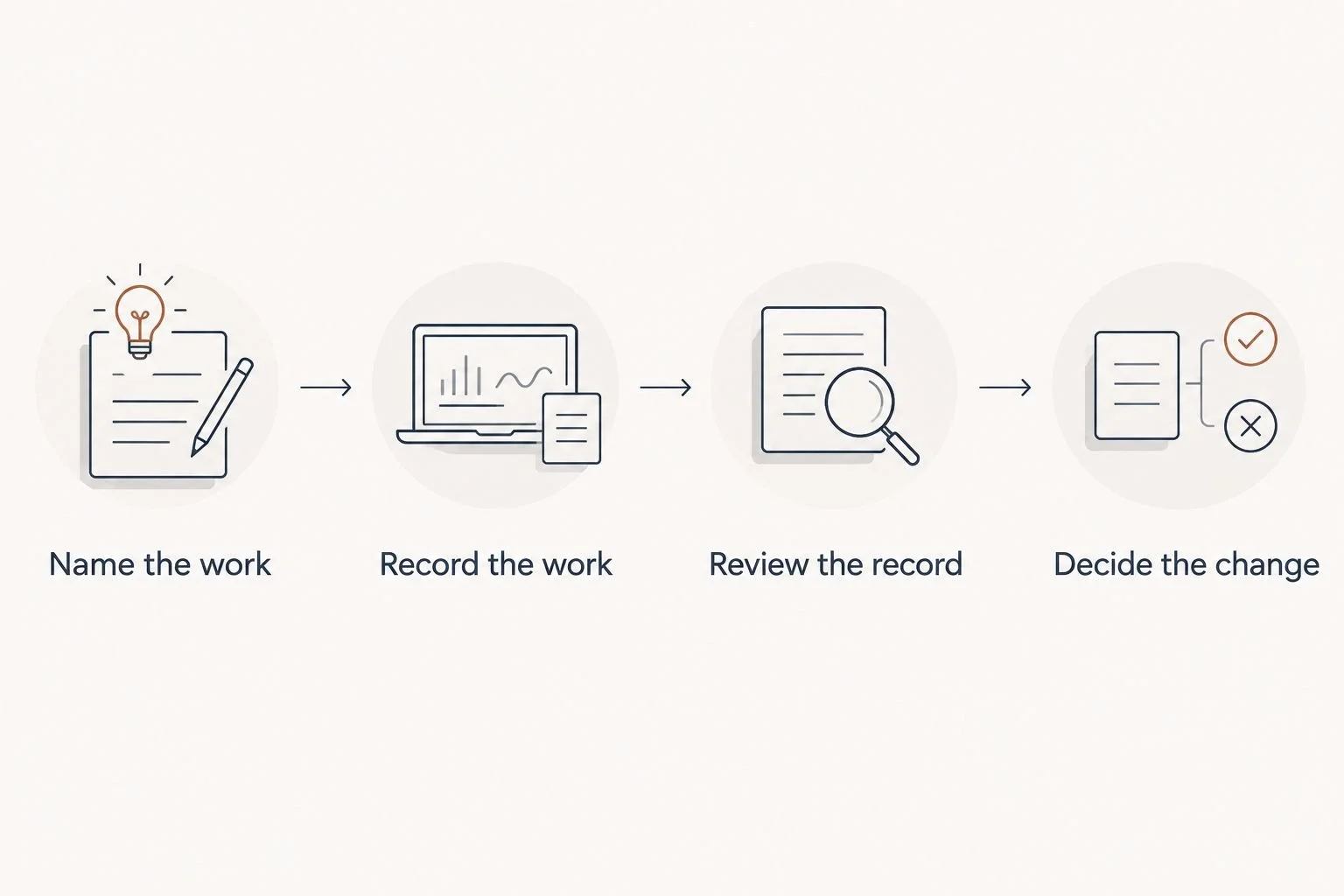
Recording time is only one part of using it to improve your workflow.
Consider this illustrative example, not a client result: a service provider records 30 minutes of preparation, a 60-minute client call, and 15 minutes of follow-up. The service required 105 minutes of work, not just the hour visible on the calendar.
That distinction helps you examine the whole delivery process. It does not prove that any part of the work is unnecessary or that automation will remove it.
Systems support or an Online Business Manager?
Choose systems support when the process needs to be built, clarified, or connected. Consider an Online Business Manager when you need ongoing coordination, task ownership, and follow-through across the business. Exact responsibilities depend on the agreed scope.
Tendedsprout focuses on done-for-you systems, operations consulting, and automation using systems already integrated into the business. That is different from choosing a time tracking product.
For example, the problem might be that nobody knows when to review hours, where approved records belong, or who prepares the invoice. Another timer does not resolve those responsibilities.
Blooming Systems is Tendedsprout's one-day workflow transformation. Start by identifying the workflow that needs attention, rather than assuming a new tool is the answer.
Which time tracking tool should you choose?
Choose Toggl Track if you want a straightforward starting point for project records. Choose Harvest for a time-to-invoice process, Clockify for shared team timesheets, Timely for automatic activity capture, or RescueTime for focus analysis.
For a 2026 setup, start with one purpose and one recording routine. Keep your existing systems unless there is a clear reason to change them.
If the difficulty is unclear handoffs rather than missing time records, fix the handoffs first. A well-defined process gives the software a useful job.
FAQ
What's the best time tracking tool for a solo service provider?
Toggl Track is the default choice for a solo service provider who wants straightforward project time records. Choose Harvest instead when connecting tracked work with invoicing is the main requirement.
Is Harvest better than Toggl Track for consultants?
Harvest is the better fit when a consultant wants time tracking and invoicing in one tool. Toggl Track fits consultants whose main need is recording and reviewing project effort.
What's the best option for team timesheets?
Clockify is the team-timesheet pick in this guide. Define shared project categories and assign responsibility for checking incomplete entries before introducing it to your team.
Can automatic time tracking replace reviewing my hours?
No, automatic time tracking does not replace reviewing your hours. Timely captures activity to help build records, but you still need to classify the work and check its context.
Can I use RescueTime to prepare client invoices?
Do not use RescueTime activity categories alone as your client billing record. Computer activity does not establish which client the work belongs to or whether it is billable.
Do I need new software if I already use Dubsado or HoneyBook?
Not automatically; define the missing function before adding software. Review how time records would fit into your existing client administration and billing process.
Can Tendedsprout help with the workflow around time tracking?
Tendedsprout provides done-for-you systems, operations consulting, and automation for established online entrepreneurs and service providers. Its focus on systems already used in the business supports a workflow-first approach rather than adding tools by default.
One last thing
Track preparation and follow-up, not just the client-facing appointment. Those records let you examine the full delivery process rather than treating the calendar as a complete account of your work.
Before installing anything, finish this sentence: I will use these records to decide _____. If you cannot name the decision, clarify the purpose first.