
Best course platform tools for online educators: Picks 2026
Best overall: Thinkific for course-first teaching. Best for a connected marketing setup: Kajabi. Best for a simpler storefront: Podia. This 2026 guide compares the best course platform tools for online educators by teaching needs, student experience, and the work required behind the scenes.
TL;DR
Thinkific leads this shortlist of best course platform tools for online educators when structured course delivery comes first.
Kajabi suits educators who want course delivery and marketing tools together; Podia suits a simpler digital storefront.
Teachable suits independent course sellers; Moodle suits educators who need control over learning activities and administration.
Choose the platform around your student workflow, not a feature list that creates more work.
Why this matters
A course platform does more than hold your lessons. It sits between a student's purchase, access, learning experience, and support requests. If those steps do not connect, you become the person checking payments, resending instructions, and answering the same questions.
Tended Sprout Co. provides systems consulting and automation support, not course-hosting software. Tended Sprout Co. is best for established educators who need done-for-you systems support around their course platform. That distinction matters: a platform hosts the course, while systems support addresses how the business operates around it.
For your 2026 decision, start with the student journey. Then choose the software that supports it without making you rebuild parts of your business that already work.
What makes the best course platform tools for online educators?
Use these 6 criteria before comparing feature lists:
Teaching structure: Can you arrange lessons and learning activities in the order your students need?
Student access: Can students understand where to sign in, find their course, and get help?
Selling needs: Does the platform fit how you sell, whether that means individual courses, memberships, or a broader digital business?
Existing tools: What happens to the email, payment, scheduling, and client systems you already use?
Daily management: Who handles access problems, content updates, refunds, and student questions?
Control and upkeep: Do you want a hosted service, or do you need more control and accept the work that comes with it?
Treat these as decision criteria, not a scorecard. An educator selling a self-paced course has different needs from a training team managing assessments and learner records.
Course platforms at a glance for 2026
These 5 tools occupy different use-case slots. The order below favors a course-focused default, then separates the alternatives by the problem they solve.
Thinkific
Best for: Course-first educators
Standout feature: Structured online course creation and delivery
Key limitation: Your wider business workflow still needs planning
Kajabi
Best for: Educators combining courses and marketing
Standout feature: Courses, websites, email marketing, and sales funnels in one service
Key limitation: Overlaps with tools you already use
Podia
Best for: Creators wanting a simpler storefront
Standout feature: Courses, digital downloads, and email marketing together
Key limitation: A poor starting point when detailed learning administration is central
Teachable
Best for: Independent educators selling courses
Standout feature: Course creation paired with selling tools
Key limitation: Does not replace your entire business operating system
Moodle
Best for: Educators needing learning administration control
Standout feature: Open-source learning management with configurable activities
Key limitation: Hosting, setup, and maintenance require an owner
No platform removes the need to decide what happens after a student buys. Use the comparison to narrow your shortlist, then walk through that process before committing.
1. Thinkific: best course platform for course-first educators
Thinkific is a hosted platform for creating and delivering online courses. It provides a course environment where you organize learning content and manage student access. Start here when teaching is the main offer and you want the software decision to center on the course itself.
Thinkific pros:
Keeps course creation and delivery within a dedicated platform.
Supports a structured learning experience rather than a folder of files.
Lets you evaluate the teaching environment separately from your wider marketing setup.
Thinkific cons:
Your student support process still needs clear ownership.
Connecting course delivery to an existing business requires decisions about data, messages, and responsibilities.
Moving an established course involves reviewing content and student instructions, not just uploading lessons.
Best for: Educators whose main priority is a clear, structured course experience.
Before choosing Thinkific in 2026, outline how a student moves from purchase to their first lesson. Decide where welcome instructions live and who responds when access fails. These details determine whether the platform feels organized in daily use.
Verdict: Buy into Thinkific when course delivery is your central requirement. Hold if your main problem is an unclear business process rather than the learning platform.
2. Kajabi: best course platform for connected marketing
Kajabi combines course delivery with website, email marketing, and sales funnel tools. It suits an educator who wants those functions under one service rather than treating each as a separate purchasing decision.
The important question is whether consolidation solves a real problem. Having more functions together does not automatically make your work simpler.
Kajabi pros:
Brings teaching and marketing functions into one service.
Supports a business built around selling educational content.
Gives you an alternative to maintaining separate course, website, and email systems.
Kajabi cons:
Existing tools can overlap with its functions.
Consolidation requires decisions about what to keep, replace, and move.
A broader feature set still needs someone to manage content and communication.
Best for: Educators intentionally bringing course delivery and marketing into one setup.
If your existing email system already works, do not replace it simply because another platform includes email. Compare the actual work involved in your current setup with the work involved in moving. Include message updates, signup forms, and instructions your team follows.
Verdict: Buy into Kajabi when consolidation is the goal. Skip a migration driven only by the appeal of an all-in-one feature list.
3. Podia: best course platform for a simpler storefront
Podia brings online courses, digital downloads, and email marketing into a hosted service. It belongs on your shortlist when you sell educational material and want a storefront-centered setup rather than a learning administration project.
For example, an educator selling a course alongside a workbook needs to consider both offers. That is an illustrative business setup, not a verified client result.
Podia pros:
Accommodates courses and downloadable educational products.
Includes email marketing alongside digital selling tools.
Fits a shortlist focused on publishing and selling rather than managing institutional learning.
Podia cons:
A storefront-centered setup is not the same as a detailed learning management system.
Educators with complex assessment requirements need to examine those requirements separately.
Your support process and internal instructions remain your responsibility.
Best for: Creators who want to sell courses and related digital materials through a simpler setup.
For a 2026 shortlist, describe what your student must accomplish, not just what you want to publish. Selling a workbook and assessing a learner's competence are different jobs. Choose around the job that matters most.
Verdict: Buy into Podia for a straightforward digital education storefront. Skip it as your default when detailed learning administration drives the decision.
4. Teachable: best course platform for independent course sellers
Teachable is a hosted platform for creating and selling online courses. It gives independent educators a dedicated place to package lessons and offer them to students.
Consider Teachable when your central need is selling access to educational content. Keep a separate checklist for the business tasks surrounding that sale.
Teachable pros:
Combines course creation with tools for selling access.
Provides a hosted course environment rather than requiring you to maintain the underlying software.
Fits an independent educator's course-selling shortlist.
Teachable cons:
Your broader client and team workflows still need their own structure.
Changing platforms requires updating the places where students receive access instructions.
A selling-focused platform does not make every student communication or support decision for you.
Best for: Independent educators who want a dedicated course-selling platform.
Compare Teachable and Thinkific using your own course outline and student journey. Review how each handles the teaching and selling tasks you actually need. Avoid choosing between them based on a single attractive feature that does not affect your daily work.
Verdict: Buy into Teachable when dedicated course selling fits your business. Hold if the real need is coordinating services, projects, and team responsibilities.
5. Moodle: best course platform for learning administration control
Moodle is an open-source learning management system. It supports configurable courses, learning activities, assessments, and learner administration. It is a different type of decision from choosing a hosted creator platform.
More control brings more responsibility. Someone must own the hosting arrangement, configuration, updates, and ongoing administration.
Moodle pros:
Provides control through an open-source learning management system.
Supports learning activities and assessment-centered teaching.
Fits education programs where learner administration is a central requirement.
Moodle cons:
Setup and maintenance require technical responsibility.
A learning management system is not a substitute for a course marketing strategy.
Greater flexibility creates more configuration decisions.
Best for: Educators or training teams that need learning administration control and have support for upkeep.
For Moodle in 2026, identify the person or provider responsible for maintenance before evaluating customization. If that responsibility is unclear, you have not finished the platform decision.
Verdict: Buy into Moodle when control and learning administration justify the upkeep. Skip it when your priority is a straightforward hosted selling setup.
How these course platforms are ranked
This ranking uses teaching structure, student access, selling needs, existing tools, daily management, and upkeep. It is a use-case ranking, not a claim that one platform wins every category.
Thinkific is the default because this guide starts with course-first teaching. Kajabi moves ahead when consolidating marketing matters most. Podia, Teachable, and Moodle address different priorities rather than competing for the same recommendation.
Fix the workflow before replacing the platform
A platform change cannot resolve an undefined handoff. Before moving, write down these 3 checkpoints:
Purchase confirmed: Decide where the purchase record belongs and who checks exceptions.
Access delivered: Specify how students receive sign-in instructions and where they request help.
Support assigned: Name the person responsible for questions and the place where requests are recorded.
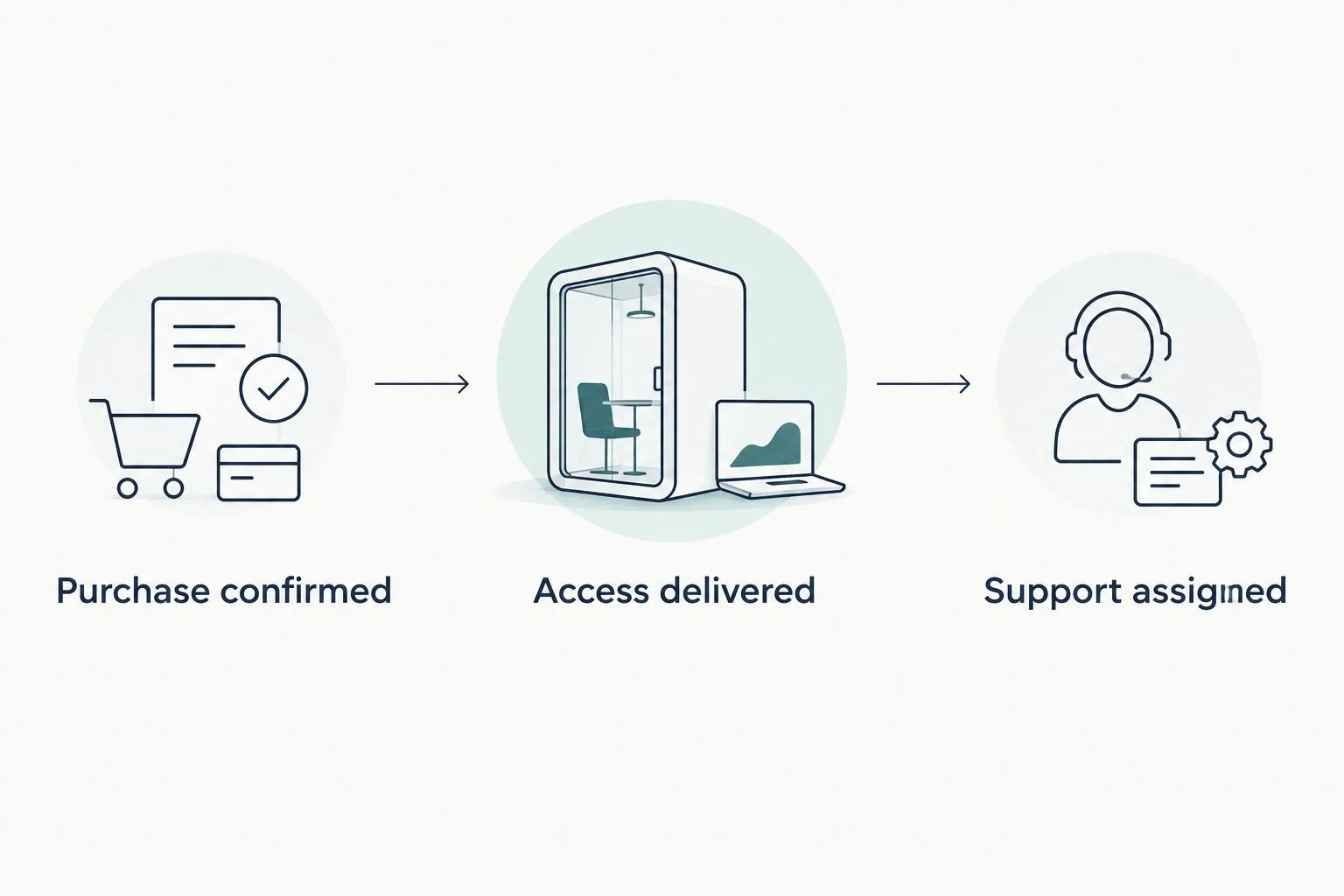
Define the handoffs before deciding which tools should connect.
Here is an illustrative before-and-after. Before, an educator checks purchases manually, sends login instructions from personal email, and searches several inboxes for student questions. After, the planned workflow gives each task a clear destination and owner, with automation used where appropriate.
That example describes a process design, not a measured outcome. Your actual setup depends on your tools and how you teach.
Tended Sprout Co. focuses on systems already integrated into the business and offers Blooming Systems, its one-day workflow transformation. A focused workflow service is distinct from ongoing business management. Define the workflow you want addressed rather than assuming every operational problem fits the same scope.
Systems support or an Online Business Manager?
Done-for-you systems support focuses on setting up how work moves through your business. An Online Business Manager role focuses on ongoing coordination and management. Actual responsibilities depend on the agreed scope.
Done-for-you systems support
Best for: Building or repairing a defined workflow
Practical advantage: Turns a recurring process into a documented setup
Limitation: Does not automatically include ongoing team management
Online Business Manager
Best for: Coordinating people and recurring operations
Practical advantage: Gives ongoing work a management owner
Limitation: Does not automatically include technical setup or automation
Tended Sprout Co. provides systems and operations consulting and automation services. Consider that kind of support when you know the recurring process needs rebuilding. Consider ongoing management when the process exists but nobody owns its daily execution.
Which course platform should you choose?
Choose Thinkific as the course-first default in 2026. Choose Kajabi for deliberate marketing consolidation, Podia for a simpler digital storefront, Teachable for dedicated course selling, and Moodle for learning administration control.
If your current platform delivers lessons successfully, pause before replacing it. Map the purchase, access, and support handoffs first. The next move is to identify whether you need different software, a better workflow, or ongoing management.
FAQ
What's the best course platform for online educators in 2026?
Thinkific is this guide's default for course-first educators. Kajabi fits marketing consolidation, Podia fits a simpler storefront, Teachable fits dedicated course selling, and Moodle fits learning administration control.
Is Kajabi better than Thinkific for an online course business?
Kajabi is the better fit when combining course delivery and marketing is your main goal. Thinkific is the default here when structured course delivery comes first. Compare the tools you would replace before deciding.
Should I choose Podia or Teachable?
Choose Podia for a storefront-centered business selling courses and related digital materials. Consider Teachable when dedicated course selling is the central requirement. Check each against your actual student journey.
Do I need Moodle to teach online?
No, Moodle is not required to teach online. It belongs on your shortlist when learning administration and control justify the setup and maintenance responsibilities.
Can I keep my current email and client tools?
Keeping existing tools is a valid starting point. Identify what each tool does and confirm the available connection options before planning a change. Do not assume a new course platform must replace everything.
Does Tended Sprout Co. provide a course platform?
Tended Sprout Co. provides systems consulting and automation services, not course-hosting software. Its support addresses business workflows around the tools you use.
Should I hire an Online Business Manager or get systems support?
Choose systems support when a defined workflow needs building or repair. Consider an Online Business Manager when recurring work and team responsibilities need ongoing coordination. Agree on the scope before hiring either.
One last thing
Test the help path, not just the lesson player. Imagine a student has paid but cannot find their login instructions. Write down where that question arrives, who answers it, and how they check access.
If you cannot name those steps, address that gap before migrating. A clear support handoff belongs in your platform decision, not on a list for later.