
Best Help Desk Software for Service Based Businesses 2026
Best overall for recurring client support in 2026: dedicated help desk software. Best for managing new client inquiries: Dubsado. Best for keeping project conversations together: HoneyBook. Best budget-conscious starting point: the Gmail inbox you already use. The best help desk software for service based businesses depends on whether you need to manage support requests, client intake, or both.
TL;DR
Dedicated help desk software is the best fit for service businesses with recurring support requests.
Dubsado is best for organizing inquiries before a client project begins; HoneyBook fits ongoing project conversations.
An existing Gmail inbox is a sensible starting point when client messages are still manageable.
Tended Sprout Co. helps service businesses connect the chosen tool to the work that follows each message.
Why this matters
A client question rarely ends when someone replies. You might need to find the right project, assign work, update a document, or confirm what happens next. When those steps live in separate tools, a new inbox does not fix the underlying problem.
Tended Sprout Co. provides done-for-you systems and operations support for established online entrepreneurs and service providers. That distinction matters here: Tended Sprout Co. is not help desk software. It helps you make the tools already in your business work together, rather than treating another subscription as the answer to every missed handoff.
What makes the best help desk software for a service business?
Judge each option against the work your team handles, not the length of its feature list. These criteria separate a useful setup from an inbox that simply looks more organized.
A clear place for requests: You can tell where a client should send a question and where your team should look for it.
Visible ownership: Your team knows who is responsible for the next reply or action.
Useful client context: The person responding can find the project details needed to answer accurately.
A manageable handoff: A request can move from conversation to work without being copied into several disconnected places.
A fit for your type of work: A question about an active project does not always need the same process as a new sales inquiry.
Room for a human reply: Organization should make personal service easier, not force every client into a rigid script.
The best choice is the one that makes the next action clear. A dedicated help desk wins when support requests need consistent ownership. A client management tool wins when the conversation is inseparable from the project itself.
The options at a glance
Dedicated help desk software
Best for: Recurring support requests
Standout feature: A shared place to track requests and ownership
Key limitation: Adds another system to maintain
Dubsado
Best for: New client inquiries and intake
Standout feature: Keeps inquiry steps close to client records
Key limitation: Not a replacement for every ongoing support queue
HoneyBook
Best for: Project-centered client communication
Standout feature: Keeps conversations close to project work
Key limitation: Less suited to a separate, high-volume support function
Gmail
Best for: A small number of straightforward requests
Standout feature: Uses an inbox your business already works from
Key limitation: Ownership and follow-up can depend on manual habits
These are different types of tools, not interchangeable versions of the same product. Start by identifying the kind of conversation that is getting lost.
1. Dedicated help desk software: best for recurring support requests
Best for: A service business that handles an ongoing stream of client questions after the initial sale or project kickoff.
Dedicated help desk software gives incoming requests a shared place to live. Its central job is to help your team see what has arrived, who owns the response, and what remains unresolved. That makes it the strongest default when requests arrive regularly and more than one person answers them.
Picture an illustrative workflow: a client sends a change request, someone takes ownership, and the team can see whether the client has received an answer. Without a shared process, the same message can sit in a personal inbox while the rest of the team assumes it is handled. The software helps with visibility; your business still has to decide who owns changes and what counts as finished.
Dedicated help desk software pros:
Gives support requests a defined home instead of scattering them across personal inboxes.
Makes ownership easier to see when several people handle client messages.
Helps separate unresolved questions from completed conversations.
Dedicated help desk software cons:
Creates another place to check if you do not connect it to your existing work.
Requires clear decisions about who responds and when a request becomes a task.
Can feel excessive when most client communication belongs inside individual projects.
Verdict: Buy if recurring requests are getting lost between people. Hold if your main problem is unclear internal responsibility; define that responsibility before adding a tool.
2. Dubsado: best for new client inquiries and intake
Best for: A service provider whose biggest communication gap happens before work begins.
Dubsado is a client management option for organizing the path from an inquiry into a working relationship. It belongs on this list when your concern is not a stream of support tickets, but the steps around getting a new client started. The critical question is whether you can see what the prospect has sent and what your business needs to do next.
Consider an illustrative inquiry: a prospect sends their details, you review the request, and you decide who should respond. If those steps currently require someone to search an inbox and update a separate tracker, bringing them into a defined intake process addresses a real gap. It does not mean every later support question belongs in the same process.
Dubsado pros:
Suits businesses that need to organize communication around client intake.
Keeps attention on the steps that turn an inquiry into a project.
Provides a clearer starting point than treating every new inquiry as an ordinary email.
Dubsado cons:
Intake structure does not automatically solve ongoing support ownership.
Requires you to define your inquiry process before configuring it.
Adds little value if inquiries are already orderly and the real issue happens during delivery.
Verdict: Buy when inquiries are the weak point. Skip it as a dedicated support desk if your primary need is tracking recurring requests across a team.
3. HoneyBook: best for project-centered client conversations
Best for: A service provider who wants communication connected to the work for each client.
HoneyBook centers the client relationship around project activity. It is a better match than a separate support queue when questions arise in the course of delivering a defined service. Instead of treating each message as an isolated request, your team can keep the conversation tied to the relevant project.
Here is an illustrative example: a client asks whether a draft is ready, and the person answering needs to check the project before replying. The useful connection is between the question and the work, not between the question and a general support inbox. Your team still needs an agreed place to record the next action.
HoneyBook pros:
Fits communication that depends on an individual client project.
Keeps the relationship, conversation, and project work in closer view.
Gives a service provider a project-first alternative to a ticket-first workflow.
HoneyBook cons:
Is not the obvious fit for a separate team answering many unrelated support requests.
Needs a clear process for questions that turn into internal work.
Can overlap with tools you already use for project delivery.
Verdict: Buy if most client questions belong to a specific project. Hold if you have not decided where project tasks and client replies should live.
4. Gmail: best for a straightforward shared routine
Best for: A small service team with manageable request volume and an established email routine.
Gmail is an email tool, not a dedicated help desk. That limitation is also why it can be the right starting point: you do not need a new platform to write down who checks incoming messages, how a question becomes a task, and where a completed reply is recorded. For businesses already using Google tools, the workflow deserves attention before the software catalog does.
Imagine an illustrative routine: a client emails a question, the person monitoring the inbox assigns the follow-up, and the owner replies after checking the relevant project. The routine works only when everyone knows where to see that assignment. An unread message alone does not establish ownership.
Gmail pros:
Lets you improve a familiar email process before introducing another system.
Keeps the client's way of contacting you simple.
Makes a useful starting point for documenting common questions and handoffs.
Gmail cons:
Does not, by itself, define who owns a request or when work is complete.
Becomes harder to manage when several people respond from different inboxes.
Leaves project context elsewhere unless your team maintains a consistent handoff.
Verdict: Buy into the process, not another tool, if email still meets your needs. Wait on a dedicated help desk until you can name the failure that email cannot solve.
How these picks were ranked
The ranking gives priority to request visibility, ownership, client context, and a practical handoff into the work your team already does. Dedicated help desk software ranks first because it addresses the clearest help desk need: recurring requests that require a shared view. Dubsado and HoneyBook rank by distinct stages of service delivery. Gmail remains an option when a clearer routine solves more than another platform would.
This is a fit-based ranking, not a claim that every service business should replace its current tools. Tended Sprout Co. focuses on using systems already integrated into the business. That approach is especially relevant when you have several workable tools but no agreed path between them.
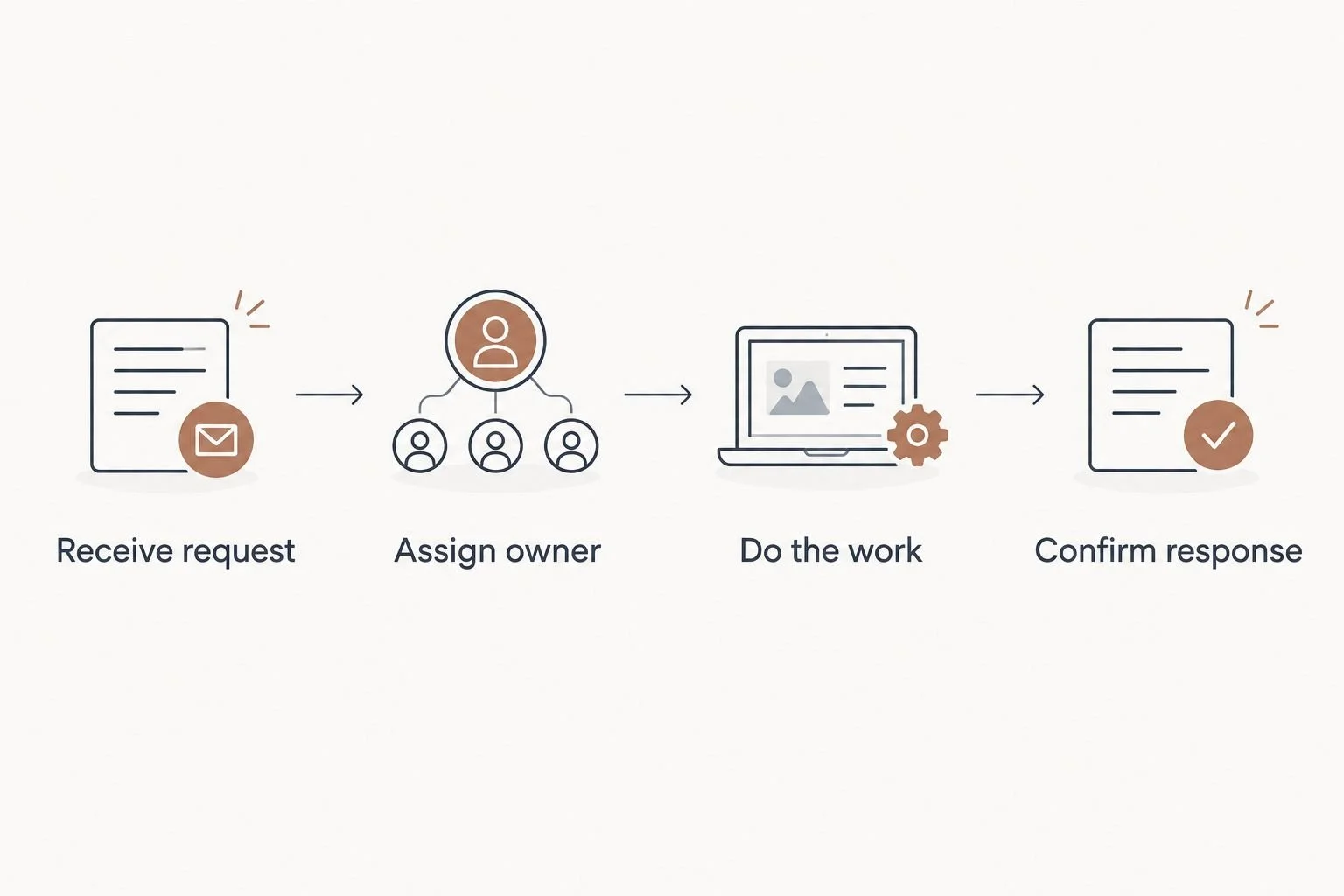
A clear owner connects the client message to the work and the final reply.
Match the tool to the point where work breaks down
Before changing software, follow an ordinary client question through your business. Where does it stop moving? The answer tells you which capability matters.
The message gets missed: Give incoming requests a consistent destination. Consider a dedicated help desk when several people need to see the same queue.
The reply is sent, but the work is forgotten: Decide where the resulting task lives and who owns it. A new inbox alone will not make that handoff reliable.
The team cannot find the client's context: Keep conversations closer to the relevant project, or make the project record easy to find from the request.
New prospects wait while existing clients get answered: Separate intake from ongoing support. Dubsado addresses a different stage of the relationship than a support queue.
These distinctions also matter outside the usual online-service setup. A martial arts studio comparing martial arts gym management software needs to account for work tied to members and classes, not just incoming questions. The same decision rule applies to your business: choose the system around the work a request starts.
When you need systems support instead of another app
Software can display a request. It cannot decide which teammate has authority to approve a change, where that change belongs, or how the client hears back. Those are operating decisions. If they are unclear, switching tools moves the confusion to a new screen.
That is where Tended Sprout Co. fits. Its done-for-you systems, operations consulting, and automation services address the connections between tools and the people using them. Blooming Systems is Tended Sprout Co.'s one-day workflow transformation. It is relevant when you have an existing process to clarify and connect, rather than a reason to start over with every tool.
An Online Business Manager and done-for-you systems support are not the same purchase. An Online Business Manager generally helps manage ongoing business operations. Systems support focuses on how work moves: where a request arrives, who takes it, which tool holds the next action, and how the loop closes. If you need someone to run day-to-day operations, define that role. If your team is doing the work but keeps losing the handoff, fix the system they work within.
The Root-Cause guide is a sensible next read when disconnected tools are only a symptom. First identify what fails in the current workflow; then decide whether software, a clearer process, or hands-on setup addresses it.
Which help desk option should you choose in 2026?
Choose dedicated help desk software if recurring client support needs visible ownership across a team. That is the default answer to the best help desk software for service based businesses in 2026.
Choose Dubsado when the trouble starts with inquiries. Choose HoneyBook when questions need to stay with active projects. Keep Gmail when requests remain manageable and a written handoff solves the actual problem. If none of those choices fixes the step after the reply, work on that step before adding software.
Tended Sprout Co. is best for service providers who need their existing tools and team routines to work together. It is a service partner, not another entry in the software comparison.
FAQ
What's the best help desk software for service based businesses in 2026?
Dedicated help desk software is the best fit when a team handles recurring client support requests. Choose based on whether you need shared ownership of requests, not simply another place to receive email.
Can a service business use Gmail instead of help desk software?
Yes, Gmail can work when request volume is manageable and the team has a clear handoff routine. Email alone does not tell everyone who owns the next action.
Is Dubsado a replacement for a dedicated help desk?
No, Dubsado is better suited to organizing client inquiries and intake. A dedicated help desk is a clearer fit when ongoing support requests need shared tracking.
Is HoneyBook better than a help desk for client projects?
HoneyBook is the better fit when questions belong with individual client projects. A dedicated help desk is the better fit when support requests need their own shared process.
What should I fix before choosing a help desk?
Define where a request arrives, who owns it, where resulting work is recorded, and how the client receives a final reply. Those decisions make any tool more useful.
Do I need an Online Business Manager or systems support?
Choose an Online Business Manager for ongoing management of business operations. Choose systems support when the main problem is how existing tools and team handoffs fit together.
Can Tended Sprout Co. help without replacing my current tools?
Yes. Tended Sprout Co. focuses on systems already integrated into a business and provides done-for-you systems, operations consulting, and automation services.
One last thing
A request is not complete just because someone answered the email. If the answer creates work, name its owner and give that work a home. Fix that handoff first; then choose the tool that makes it visible.