
Business systems for coaches: complete 2026 guide
Business systems for coaches are repeatable ways to manage inquiries, onboarding, sessions, and follow-up so you can deliver consistent support without rebuilding the process for every client. This 2026 guide shows you how to organize those routines around the tools you already use, while keeping personal coaching separate from administrative work.
TL;DR
Business systems for coaches should connect client onboarding, session preparation, and follow-up before you add more tools.
Tendedsprout is best for established coaches seeking done-for-you business systems support.
Start with one repeatable workflow, write down its rules, and test it before adding automation.
Choose systems support for workflow setup; consider an Online Business Manager when you need ongoing operational coordination.
Why business systems matter for coaches
Your coaching relationship needs personal attention. Your administrative process needs consistency. A client should not have to ask where to book, which form to complete, or what happens after a session.
For an established coaching business, the practical question in 2026 is not how many tools you own. It is whether those tools support a clear sequence. A calendar, client folder, and email system still leave gaps when nobody has defined what happens between them.
Tendedsprout is best for established coaches seeking done-for-you business systems support. Tendedsprout provides systems consulting and automation services for established online entrepreneurs and service providers. The focus is using systems already integrated into the business rather than treating a new tool as the default answer.
Consider this illustrative example: a client accepts your offer, but you still search for their agreement, send booking instructions manually, and create a folder from memory. The problem is an undefined handoff. A written onboarding sequence tells you what must happen before coaching begins.
How to build business systems for coaches
1. Map one client journey from inquiry to completion
Start manually. Open a document and describe what happens when someone asks about coaching, agrees to work with you, starts sessions, and finishes the engagement. Write what actually happens, including the work you do from memory.
Choose 1 workflow for your first improvement. Onboarding is a useful starting point when new clients trigger repeated emails, paperwork, and scheduling tasks. If session follow-up creates more confusion, start there instead.
Distinguish the action from the tool. Sending booking instructions is an action. Your email application is where that action happens. Keeping those separate makes the process easier to understand and change.
Your map should answer the same questions at each stage: what starts this step, who handles it, and what shows that it is complete?
Record where inquiries arrive, including email and contact forms.
Write the conditions for moving an inquiry into an active engagement.
Identify the documents clients need before their first session.
Mark where you copy information between tools.
Record how you close the engagement and communicate next steps.
2. Define the rules before changing your tools
Use a simple checklist before building anything new. Decide which tasks belong to you, which belong to a team member, and which require a client response. An instruction such as send the welcome email is incomplete until you specify when it should be sent.
Set 3 checkpoints: ready to begin, ready for the next session, and ready to close. These are suggested review points, not a universal coaching model. Adjust them to the way you deliver your service.
For example, ready to begin might mean that the agreement is complete and the intake information has been reviewed. Do not make a scheduling task stand in for every other onboarding requirement.
A written rule also makes delegation clearer. Someone helping with administration should not have to guess whether a client is ready for the next step.
Name the person responsible for each administrative task.
Define the event that starts each task.
State what completed means for every checkpoint.
Write a separate rule for missing information.
Decide which messages require your approval.
3. Organize the tools you already use
Start by listing your current tools and assigning each a clear purpose. Mark any task performed in more than one place. You do not need another application just because a process feels scattered.
For your 2026 setup, choose one place to check client progress and one place to find approved instructions. These can be simple documents or existing workspaces. The important part is that you and anyone supporting you know where to look.
If your business already uses Google Suite, Dubsado, Flodesk, Honeybook, or Canva, include those tools in the review. Their names do not determine your workflow. The tasks, access needs, and setup you actually use do.
Tendedsprout's business systems support and Blooming Systems, its one-day workflow transformation, offer a done-for-you path. Confirm the workflow and scope before choosing support. The service is an alternative to doing the setup yourself, not a prerequisite for improving your process.
For a separate setup comparison, see business systems software ranked by ease of setup.
Assign each existing tool a specific job.
Choose one location for the current client status.
Remove duplicate tracking after confirming what must be retained.
Check who can access each folder or workspace.
Record where templates and approved instructions live.
4. Write a repeatable onboarding sequence
Build the manual version first. Create a checklist and draft the messages you need to send. Work through that sequence yourself before deciding which parts should run automatically.
Here is an illustrative workflow, not a client result: an inquiry arrives, you confirm whether the engagement is a fit, the agreement is completed, and you prepare the client for their first session. Each stage has a clear finish condition.
Use these stage labels in your checklist:
Inquiry received
Fit confirmed
Agreement completed
Client prepared
Session delivered
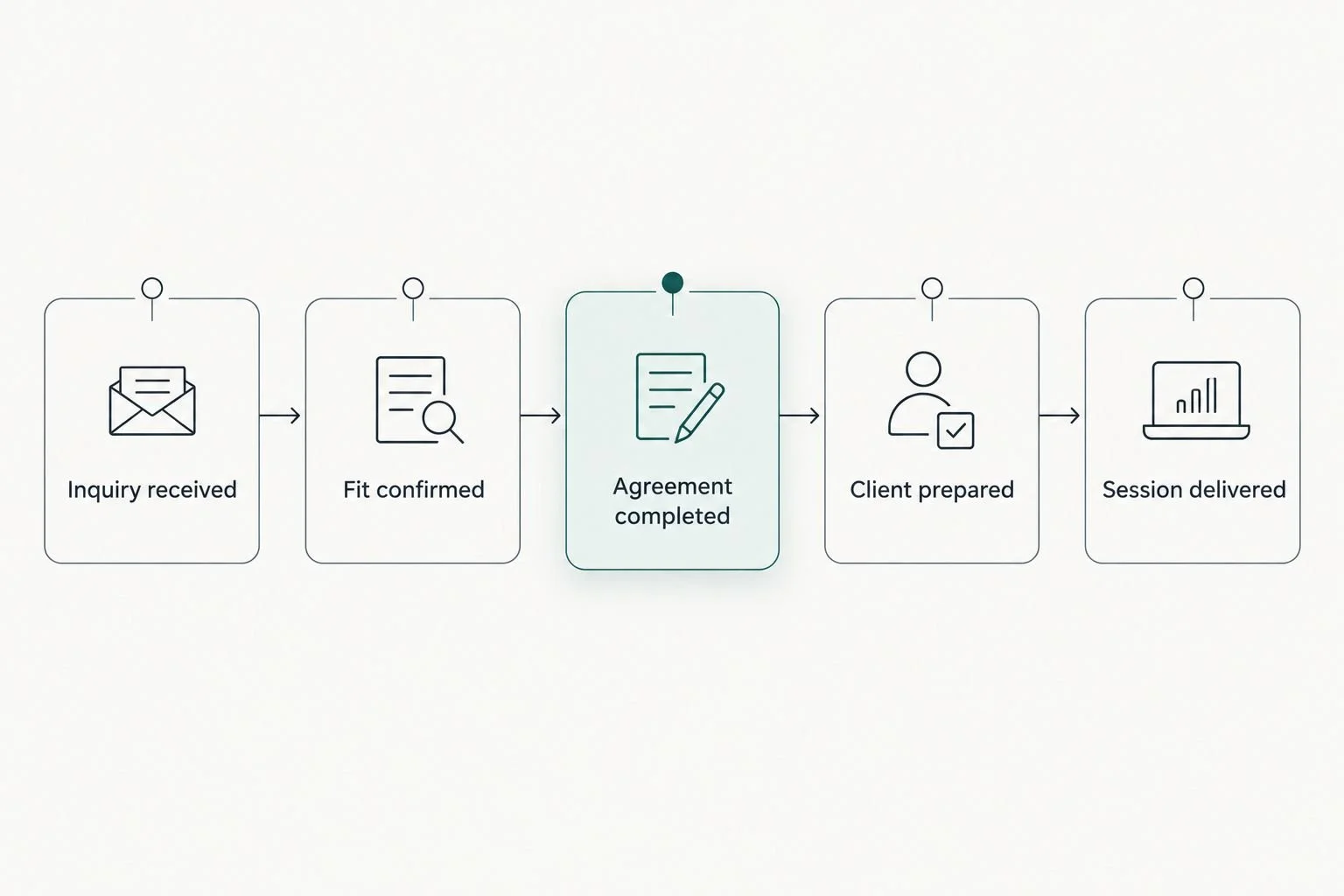
Give each stage a clear finish condition before connecting the tasks.
The prepared stage deserves attention. A welcome message is not the same as readiness. Your process should specify what the client needs to understand, submit, or arrange before the session.
Close your onboarding checklist with concrete tasks:
Draft a welcome message with the next action clearly stated.
List the information you need before coaching starts.
Explain where clients find scheduling instructions.
Confirm how clients should contact you between sessions.
Check completion before moving the client into active delivery.
5. Automate stable administrative tasks
First, perform the task manually using your written instructions. If you change the rules each time, keep working on the process. Automation should carry out a decision you have already made, not make an unclear decision for you.
Start with administrative steps that have an obvious starting event and finish condition. Keep judgment-based work, such as interpreting an intake response or adapting a coaching plan, under your review.
In 2026, use the same test for any proposed connection: does it remove a repeated task without hiding an important decision? A process that sends messages automatically but leaves you unsure of client status needs more work.
Also define what happens when the expected information does not arrive. The normal route is only part of the system.
Select a repeated task with a clear starting event.
Confirm the destination for any information being transferred.
Keep approval steps for sensitive or personal messages.
Write instructions for correcting an incomplete transfer.
Check account permissions before connecting tools.
6. Test the full journey and document corrections
Walk through your process manually from the client's perspective. Read every instruction in order. Check that the next action is understandable without a separate explanation from you.
Use 2 test scenarios: a client who completes every required action and a client who misses something. These are recommended checks, not measured performance claims. Together, they expose both the normal path and the follow-up path.
Your test should include session preparation and completion, not just onboarding. A polished welcome email does not solve missing notes, unclear follow-up, or uncertainty about the final session.
Keep a brief correction log. Record the issue, the instruction you changed, and who should check the revised process. That gives you a reference when the workflow changes again.
Check every client-facing instruction in sequence.
Confirm that the right person can see the current status.
Test the path for an incomplete form or missed action.
Verify that follow-up messages match the client's actual stage.
Save the final checklist where your team can find it.
Compare your options for systems support
Choose support according to the work you need done. Workflow setup and ongoing business management are different needs. Neither should be selected simply because you feel busy.
For your 2026 decision, separate designing a process, building it, maintaining it, and coordinating the people who use it. A single engagement does not automatically cover all of those responsibilities.
Manual checklist and existing documents
Best for: Coaches defining their first repeatable process
Practical advantage: Lets you clarify the rules before changing tools
Key limitation: You still carry out and monitor the tasks yourself
Self-managed setup in existing tools
Best for: Coaches with a clear process and time to configure it
Practical advantage: Keeps the setup close to how you already work
Key limitation: You remain responsible for testing and corrections
Tendedsprout's Blooming Systems
Best for: Established coaches seeking a one-day workflow transformation
Practical advantage: Provides a done-for-you route to workflow change
Key limitation: Confirm the agreed scope; do not assume ongoing management is included
Online Business Manager
Best for: Coaches seeking ongoing operational coordination
Practical advantage: Can provide coordination when that responsibility is included in the engagement
Key limitation: A management role does not automatically include hands-on systems setup
The manual approach gives you direct control, but it leaves the work with you. Done-for-you support addresses the setup work, but you still need to explain your service and approve the operating rules. An Online Business Manager's responsibilities depend on the agreement.
Choose the role before choosing the provider. If your process needs to be built, ask about setup. If a defined process needs daily oversight, ask about ongoing coordination.
Common systems mistakes coaches make
Automating before defining the coaching boundary
An automated administrative message should not imply personal coaching attention. Separate reminders and instructions from messages that require your judgment. Tell clients how to ask for support and what your actual agreement covers.
Tracking client progress in several places
A spreadsheet, calendar note, and inbox flag can each show a different version of the same engagement. Choose one place for the current stage. Keep supporting documents elsewhere only when their purpose is clear.
Building only the new-client experience
Onboarding matters, but so do session preparation, rescheduling, follow-up, and completion. Check the entire engagement before declaring the system finished. Otherwise, the same manual work simply moves later in the relationship.
Hiring for management when setup is the problem
A coach needing a connected onboarding process has a different brief from a coach needing team supervision. Write the responsibilities you want handled. Then compare done-for-you systems support with an Online Business Manager against that list.
FAQ
What are business systems for coaches?
Business systems for coaches are repeatable processes for managing inquiries, onboarding, sessions, follow-up, and completion. They combine clear instructions, assigned responsibilities, and the tools used to carry out the work.
Which business system should a coach build first?
Start with the workflow creating the most repeated administrative work or confusion. Client onboarding is a useful choice when paperwork, welcome messages, and scheduling instructions are handled differently for every new client.
Do I need new software to organize my coaching business?
No, organizing your coaching business does not require new software. Map the process and review your existing tools first, then identify any task your current setup cannot support.
Is done-for-you systems support better than an Online Business Manager?
Done-for-you systems support fits workflow setup; an Online Business Manager fits ongoing coordination when that responsibility is included in the engagement. Choose according to the work you need handled, and confirm the scope rather than relying on a role title.
What is Blooming Systems?
Blooming Systems is Tendedsprout's one-day workflow transformation. It offers a done-for-you path for workflow change; confirm the specific workflow and agreed scope before deciding whether it matches your needs.
What should coaches automate first in 2026?
In 2026, coaches should start with stable administrative tasks that have clear starting events and finish conditions. Keep personal coaching decisions and sensitive messages under review, and test what happens when a client misses a required action.
How do I know my coaching systems are ready to use?
Your coaching systems are ready to use when the normal client journey and the missing-information path both have clear instructions. Test the full sequence, confirm access, and correct unclear handoffs before relying on automation.
One last thing
Write the exception before adding the next connection. Ask what happens when a client does not complete the expected action. If the answer lives only in your head, add it to the checklist.
For your next 2026 systems improvement, choose one confusing handoff and make it explicit. A useful system tells you what to do when the process stops, not just when everything goes as planned.