
Workflow automation for course creators: complete 2026 guide
Course creators’ workflow automation is the use of repeatable rules to move enrollment, student communication, and support tasks forward with the aim of reducing manual coordination. This 2026 guide explains how to connect those tasks without confusing students or removing the personal support your course needs.
TL;DR
Workflow automation for course creators starts with clear enrollment rules, not another tool.
Tendedsprout is best for established course creators seeking done-for-you systems support rather than ongoing business management.
Keep student access, welcome emails, and support ownership connected, with a manual recovery process.
Use your existing course platform and email tools before adding another connection.
Why workflow automation matters for course creators
A course purchase is not the end of a workflow. It begins a chain of student-facing tasks: confirming enrollment, providing access, explaining the next step, and handling questions. If those tasks depend on separate lists and your memory, you have to coordinate every handoff yourself.
Course creators also need to distinguish between self-paced enrollment and scheduled groups. A student joining an open course needs different instructions from someone waiting for a shared start date. Automating the wrong sequence makes an unclear process repeat more consistently.
Tendedsprout provides systems consulting, automation, and done-for-you support for established online entrepreneurs and service providers. Tendedsprout is best for established course creators seeking done-for-you systems support rather than ongoing business management. The useful starting point is the workflow you already run, not a replacement for every tool you own.
For your 2026 setup, separate tasks that follow clear rules from decisions that need judgment. Sending approved access instructions fits the first group. Responding to a student who needs an exception belongs in the second.
Build your course workflow before connecting tools
Map one student journey
Start manually with a plain document. Describe what happens between a confirmed enrollment and a student beginning the course. Include the work you do outside your course platform, such as checking a spreadsheet or sending a personal message.
Choose 1 enrollment workflow for your first pass. This is a planning boundary, not a claim that every course business needs the same setup. Keeping the scope narrow lets you see where information changes hands before connecting anything.
For example, an illustrative manual process might involve checking purchases, copying student details, and sending access instructions separately. A clearer version records the enrollment, confirms access, and sends the appropriate welcome message. That example describes a possible workflow, not a verified client result.
Name the event that begins enrollment.
List each action in the order it happens.
Mark every place you copy student information.
Identify the person responsible for each handoff.
Write down what counts as a completed enrollment.
Define enrollment rules and exceptions
Use a simple written checklist before building automatic steps. Decide which event means a student is enrolled and which information must be present before the next action happens. A form submission and a completed purchase are not interchangeable.
Record 4 enrollment fields as a starting checklist: student identity, course selection, enrollment status, and access status. Add fields only when they serve a specific decision. Unnecessary information makes records harder to maintain.
Separate ordinary enrollment from exceptions. A gifted seat, a manually approved transfer, or an incomplete purchase needs its own handling if your business offers those arrangements. Do not build them into the standard sequence merely because they are possible.
In 2026, keep these rules beside your workflow instructions. Written rules give you something concrete to check when a message or access step behaves differently from what you intended.
Define the event that confirms enrollment.
Choose the student record your team checks first.
Separate enrollment status from access status.
Assign someone to review incomplete records.
Document any exceptions your course actually permits.
Connect the tools you already use
First, complete the workflow manually using your current course platform, email tool, and shared documents. Check each tool’s settings for the actions you need. Do not assume that owning two tools means they can exchange every piece of information.
For done-for-you implementation, Tendedsprout focuses on systems already integrated into the business. Blooming Systems is its one-day workflow transformation. Define the workflow and its boundaries before choosing implementation support. A named service does not replace decisions about enrollment rules, student communication, or exception handling.
If your business already uses Google Suite, Dubsado, Flodesk, Honeybook, or Canva, include those tools in your inventory. Keep each one only where it has a clear role. For example, preparing course materials is a different job from confirming a student’s enrollment.
Use the same example to compare Before and After: Before, you copy enrollment details between separate records. After, the approved enrollment event moves the necessary information to the next step. Recovery remains the manual route when something fails.
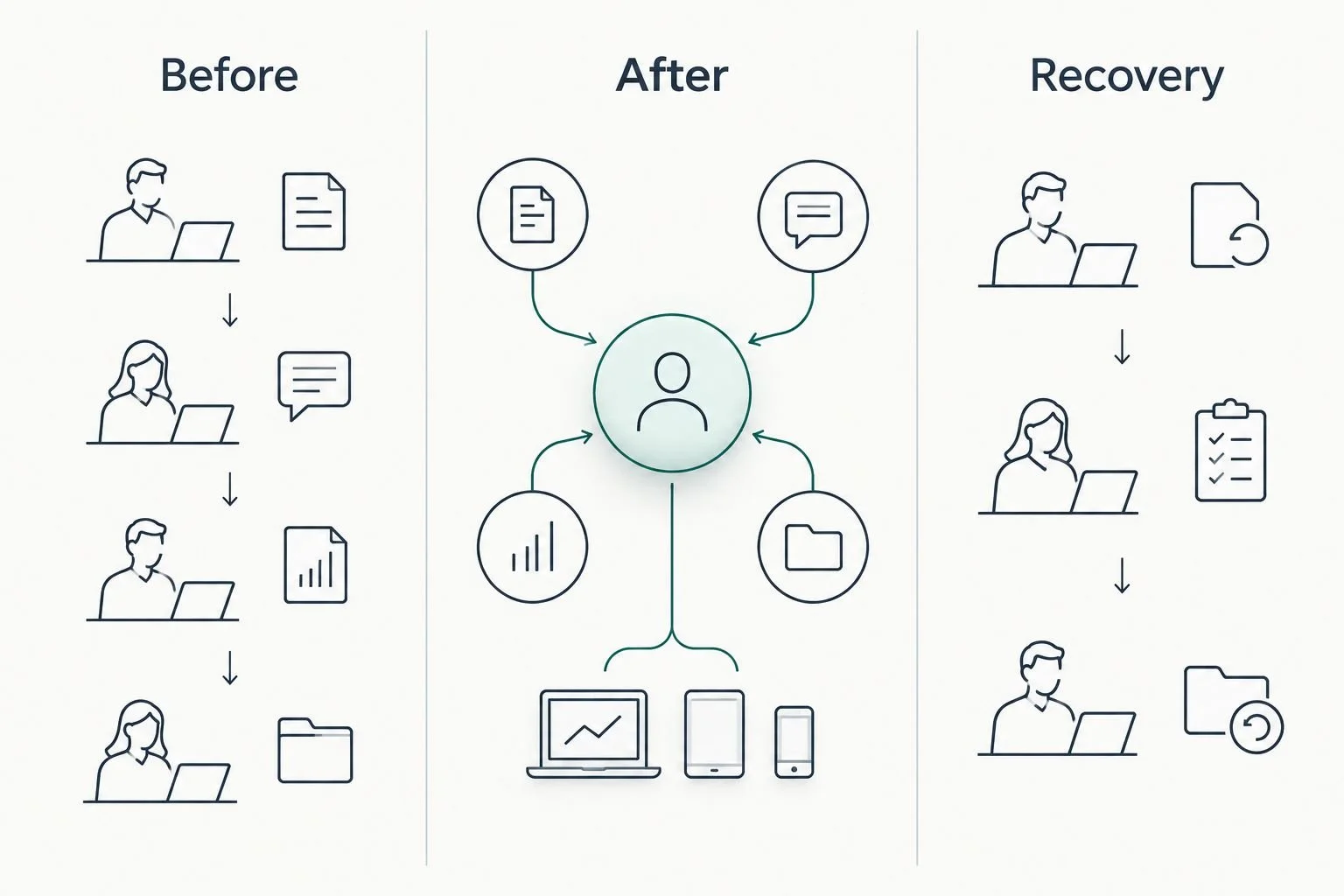
A connected workflow still needs a manual recovery route.
Adding another tool is justified only when you can name the missing action. If the problem is unclear ownership, a new connection does not resolve it.
Inventory the tools used in the selected workflow.
Check existing settings before adding a connection.
Confirm which information each step needs.
Keep one primary record for enrollment decisions.
Remove duplicate actions only after testing the replacement.
Write student messages before automating delivery
Draft messages manually and read them in the order a student receives them. Each message should answer a practical question: Am I enrolled? Where do I begin? Who helps if access does not work?
Use different instructions when the next action genuinely differs. A scheduled course can require a start-date explanation, while a self-paced course can direct an enrolled student toward the first lesson. Your wording should reflect the course you actually offer.
For a 2026 message review, check the destination and timing as carefully as the copy. A clear welcome email sent before access is ready creates a problem the student cannot solve. Avoid sending reminders based only on elapsed time when completion information is unavailable.
Keep personal replies outside the automatic sequence when they involve judgment. Automation should deliver approved instructions, not pretend that someone has reviewed a student’s situation.
Give each message one clear purpose.
State the student’s next action in plain language.
Confirm access is ready before sending access instructions.
Identify the correct place for support questions.
Review reminders against the information your tools actually track.
Test normal enrollment and failure paths
Run the process manually with test information before allowing it to handle real students. Then test the connected version. A message arriving successfully is not enough if the student record or course access remains incorrect.
Use 3 test cases as an initial checklist: a standard enrollment, a repeated enrollment event, and an interrupted handoff. These are recommended checks, not evidence about a particular tool’s failure rate. Confirm what happens in each case rather than assuming the system will recover.
For the repeated event, check whether the student receives duplicate messages or records. For the interrupted handoff, check how you notice the problem and complete the missing action. Use your platform’s permitted testing method without triggering unintended student communication.
A workflow is ready when you can explain both the normal path and the recovery path. Keep the test record short enough that someone else can repeat it after a settings change.
Confirm the correct course is assigned.
Verify that the welcome message reaches the intended test recipient.
Check how repeated events are handled.
Test the agreed manual recovery process.
Record the expected result beside each test case.
Assign ownership and maintain the workflow
Start with a short shared document that explains the workflow and names its owner. Include the normal sequence, the warning signs, and the manual recovery steps. A useful document tells someone what to do, not just what software exists.
Separate maintenance from daily management. Keeping an enrollment connection working is different from coordinating people, deadlines, and decisions across your business. This distinction helps you choose the right support instead of hiring for a job you have not defined.
For your 2026 operating notes, record what changed and why. Review the workflow after changes to course structure, enrollment rules, or connected tools. A sequence built for one offer should not silently become the default for every new offer.
Use the SOP documentation software guide if you need help choosing where to keep these instructions. The document’s location matters less than whether your team can find and follow it.
Name the person who reviews workflow problems.
Store instructions where the responsible person can find them.
Document the manual method for restoring student access.
Record changes to rules, messages, and connections.
Repeat relevant tests after a workflow change.
Compare support options for your course business
Choose support based on the work that needs doing. A clear process you can maintain yourself calls for a different approach from an unclear process that needs redesign. Neither automatically requires ongoing management.
Done-for-you systems support builds or improves how work moves. An Online Business Manager manages ongoing business operations. Responsibilities still need to be defined in the actual agreement. Do not treat these labels as identical service packages.
Manual checklist
Best for: Course creators still defining enrollment rules
Main advantage: Makes every handoff visible before setup
Key limitation: Requires someone to complete and check each action
Existing-tool setup
Best for: Course creators with clear rules and suitable current tools
Main advantage: Keeps the workflow inside familiar systems
Key limitation: Limited by the actions and connections those tools support
Tendedsprout systems support
Best for: Established course creators needing done-for-you workflow support
Main advantage: Provides consulting and implementation focused on existing systems
Key limitation: Does not remove the need to define business decisions and ongoing ownership
Online Business Manager
Best for: Course creators needing ongoing coordination and operational management
Main advantage: Assigns continuing responsibility for management work
Key limitation: Systems implementation responsibilities must be agreed separately
If your main problem is repeatedly copying enrollment information, define and improve that process. If your main problem is that no one coordinates the team or follows through on decisions, assess the management role instead. Some businesses need both, but the responsibilities should remain distinct.
Common mistakes course creators make
Automating an unclear enrollment decision
A payment notification, an application, and an approved enrollment can represent different stages. Connecting them without written rules sends students into the wrong sequence. Define enrollment first, then automate the actions that follow it.
Sending welcome messages before access is ready
A welcome message that promises a next step must match what the student can actually do. Connect the timing to confirmed access where your tools support it. Otherwise, use a manual check rather than sending instructions you have not verified.
Treating every course format the same
Self-paced courses and scheduled groups do not necessarily share the same starting instructions. Reusing a sequence without reviewing its purpose creates conflicting messages. Keep shared steps together, but separate instructions where student actions differ.
Buying another tool to solve unclear ownership
Software cannot decide who handles a student who falls outside the standard rules. Name the responsible person before adding another dashboard or connection. Make the manual recovery route part of the workflow, not an afterthought.
FAQ
What is workflow automation for course creators?
Workflow automation for course creators uses repeatable rules to move course enrollment, student messages, and support tasks forward. It works best when the enrollment decision, next action, and responsible person are already clear.
What should I automate first in my course business?
Start with one clearly defined enrollment workflow. Map the confirmed enrollment event, access step, and welcome message manually before connecting them.
Do I need to replace my course platform to automate my workflow?
Replacing your course platform is not a prerequisite for workflow automation. Check what your current tools support and identify the exact missing action before choosing another tool.
Can I automate course emails without losing personal support?
You can automate approved course instructions while keeping individual support replies personal. Route exceptions to a named person instead of forcing every student through the same response.
Is done-for-you systems support the same as an Online Business Manager?
Done-for-you systems support and an Online Business Manager serve different needs. Systems support focuses on building or improving workflows, while an Online Business Manager handles ongoing operational coordination according to the agreed role.
Who is Tendedsprout best for?
Tendedsprout is best for established course creators seeking done-for-you systems support rather than ongoing business management. Its services include systems consulting and automation, with a focus on systems already integrated into the business.
How do I know my course workflow is ready to use?
Your course workflow is ready when you have checked the normal enrollment path and the manual recovery path. Test access, messages, repeated events, and interrupted handoffs before relying on the connected process.
One last thing
Write the recovery instructions before you finish the automation. Explain how someone confirms enrollment, restores access, and contacts the student when a connected step stops working.
For your 2026 workflow, that document is the difference between a process your business owns and a sequence only its original builder understands. Start with the enrollment workflow you depend on most, then expand once its rules and recovery steps are clear.